Last update: August 2026
Best AI Coding Assistants (Free & Paid)
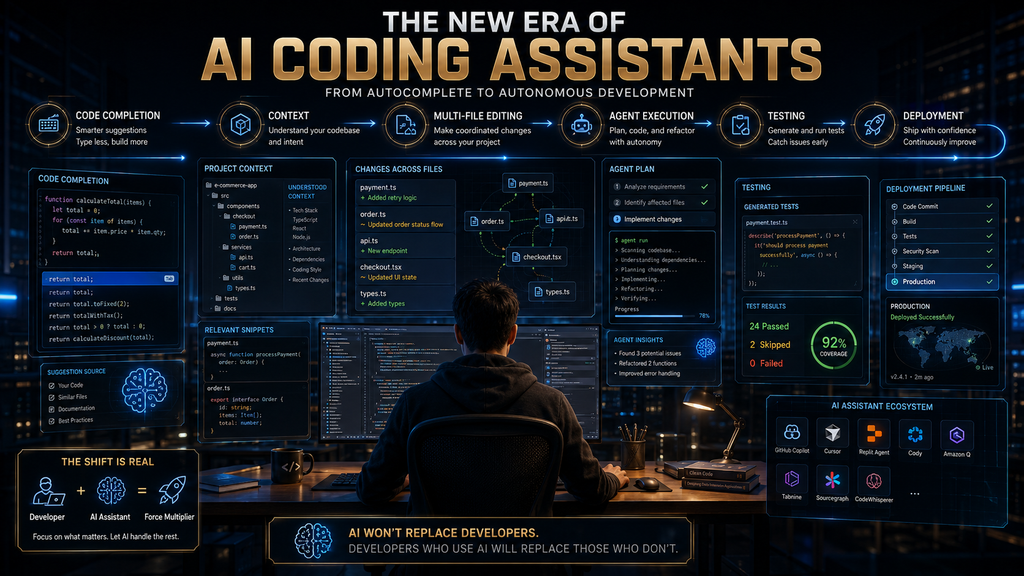
AI coding assistants have changed from simple autocomplete tools into development systems that can understand repositories, modify multiple files, run commands, generate tests, review pull requests, and increasingly work on software tasks with limited supervision.
That creates a new problem for developers: the question is no longer simply which AI writes the best code. The better question is which AI coding assistant gives you the right combination of context, autonomy, development environment, control, and cost for the way you actually build software.
That distinction matters because today’s market contains several very different product types. GitHub Copilot is deeply integrated with GitHub and existing IDEs. Cursor and Windsurf are AI-native development environments. Claude Code and OpenAI Codex are coding agents that can work from the terminal or delegated environments. Amazon Q Developer is particularly compelling for AWS-centric teams, while JetBrains AI Assistant is naturally positioned for developers already committed to JetBrains IDEs.
So this guide does not treat every product as interchangeable. Instead, it compares the development workflow each tool is designed to improve, where its strengths actually matter, what it costs, and where its boundaries become important.
Quick Answer: What Are the Best AI Coding Assistants?
The best AI coding assistant depends on your development environment and how much autonomy you want to give AI. GitHub Copilot is the strongest general-purpose choice for developers who want AI integrated into GitHub and existing IDEs; Cursor is a leading AI-native IDE; Claude Code is a strong terminal-first coding agent; and OpenAI Codex is compelling for developers who want local, IDE, and cloud-based agentic workflows.
Other strong choices include Windsurf for an AI-native editor alternative, Amazon Q Developer for AWS-heavy development, Gemini Code Assist for Google Cloud organizations, JetBrains AI Assistant for JetBrains users, Tabnine for privacy and deployment control, and Cline for developers who want an open, model-flexible agent. The important point is that there is no meaningful universal ranking without first defining the job.
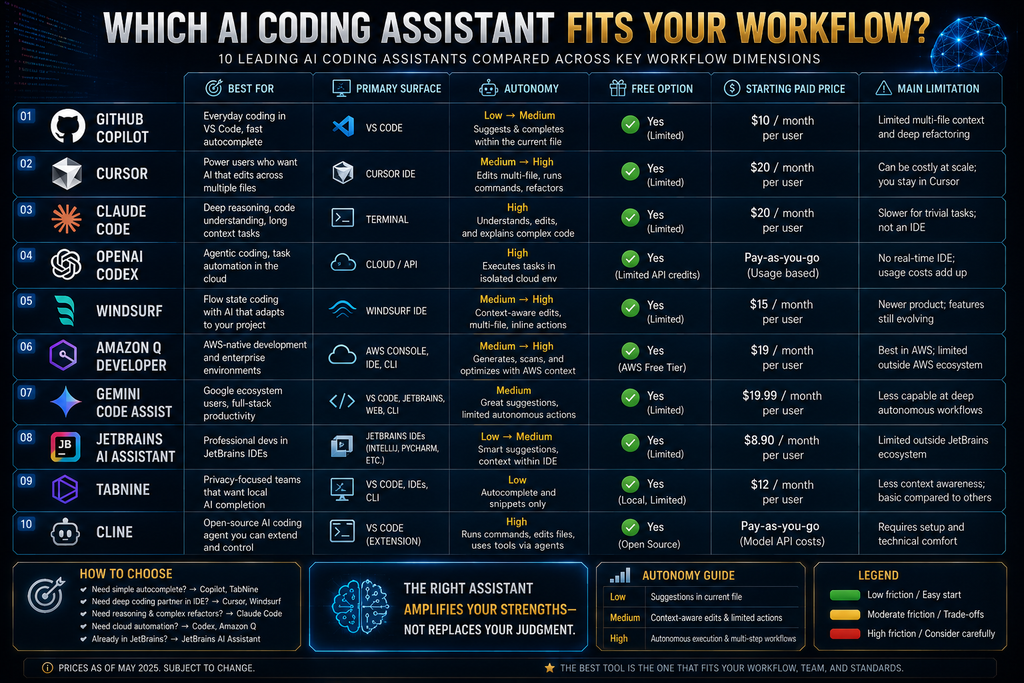
The 10 Best AI Coding Assistants at a Glance
| Tool | Best for | Development model | Free option | Starting paid price* |
|---|---|---|---|---|
| GitHub Copilot | General-purpose development + GitHub | IDE + GitHub + agents | Yes | $10/month |
| Cursor | AI-native development | AI-native IDE + agents | Yes | $20/month |
| Claude Code | Terminal-first coding | CLI coding agent | No dedicated free plan | $20/month via Claude Pro |
| OpenAI Codex | Delegated and multi-environment coding | CLI + IDE + cloud + app | Currently available on Free/Go with limits | Included with eligible ChatGPT plans |
| Windsurf | AI-native IDE alternative | IDE + Cascade agent | Yes | $15/month |
| Amazon Q Developer | AWS development | IDE + CLI + AWS ecosystem | Yes | $19/user/month |
| Gemini Code Assist | Google Cloud development | IDE + CLI + agent mode | Consumer access deprecated | Organization pricing |
| JetBrains AI Assistant | JetBrains developers | IDE + integrated agents | Yes | $10/month |
| Tabnine | Privacy and enterprise control | IDE + enterprise agent platform | No current standard free tier | $39/user/month annually |
| Cline | Open/BYOK agentic development | IDE/CLI + model choice | Yes | Pay for model inference |
*Pricing and availability can change. Usage-based AI features may create additional costs beyond the headline subscription price.
What Is an AI Coding Assistant?
An AI coding assistant is software that uses AI models to help with programming tasks such as generating code, explaining unfamiliar code, debugging, refactoring, writing tests, documenting projects, and increasingly executing multi-step development tasks.
The category used to be relatively simple. A developer typed code, the assistant predicted the next few lines, and a chat panel answered questions. That workflow still exists, but it is now only one layer of the market.
Modern coding assistants can operate at several levels:
- Completion: predict the next line or block.
- Generation: create a function, component, query, script, or configuration from instructions.
- Contextual assistance: understand files, project structure, dependencies, and surrounding code.
- Multi-file editing: make coordinated changes across a repository.
- Agentic execution: plan tasks, modify files, run commands, execute tests, and iterate.
- Delegated development: work on a task in a separate environment while the developer continues doing something else.
The more autonomy a tool receives, the more important verification becomes. A system that only suggests a line of code creates one type of risk. A system that can modify 20 files and execute shell commands creates a very different risk profile.
That is why “AI coding assistant” is now a broad category rather than a single product type.
The Four Types of AI Coding Assistants
Before comparing individual tools, it helps to understand the four major architectures competing in this market.
1. IDE-integrated assistants
These add AI capabilities to an environment you already use. GitHub Copilot, Amazon Q Developer, Gemini Code Assist, and JetBrains AI Assistant are examples.
Their advantage is low workflow disruption. You do not necessarily need to abandon your preferred editor or Git workflow just to use AI.
This is usually the safest starting point for a developer who already has an established development environment and simply wants AI assistance layered onto it.
2. AI-native IDEs
Cursor and Windsurf take a different approach.
Instead of treating AI as a plugin attached to an existing development environment, they make AI a central part of the editor itself. The distinction becomes more important when you want repository-wide reasoning, multi-file changes, agentic workflows, and AI-driven navigation to become part of everyday development.
The trade-off is switching cost. If your team has standardized on another IDE, adopting an AI-native environment can introduce workflow, training, policy, and migration considerations.
3. Terminal-first coding agents
Claude Code is the clearest example in this comparison.
The terminal becomes the interface through which you delegate development work. Instead of repeatedly asking for individual snippets, you can describe a larger task and allow the agent to inspect the repository, modify files, execute commands, and iterate.
This is powerful for experienced developers because the terminal is already where many important development operations happen.
It can also be intimidating for beginners because the abstraction level is higher. You are no longer asking AI to write one function. You are asking it to participate in a development process.
4. Cloud and delegated coding agents
OpenAI Codex increasingly occupies this territory alongside its local development interfaces.
The key concept is delegation. You can give the agent a coding task and allow it to work in an isolated environment while you continue with other work. Codex can operate through local tools and cloud environments, and its current product documentation describes repository navigation, file modification, command execution, testing, parallel agents, and automated code review workflows.
This changes the economics of AI coding because the unit of work is no longer necessarily “one prompt.” It can become an entire software task.
How We Evaluate AI Coding Assistants
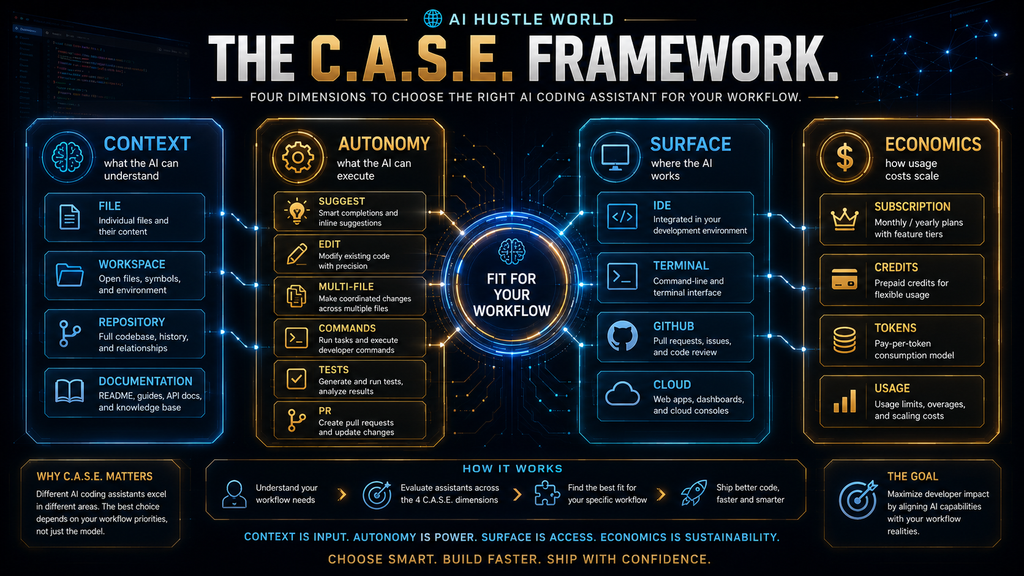
We are not assigning arbitrary five-star ratings to these products. Instead, this comparison uses five dimensions that matter more as coding assistants become more capable:
- Context: How much of the actual software project can the system understand?
- Autonomy: What can it do without constant human intervention?
- Surface: Where does it operate—IDE, terminal, GitHub, cloud, or multiple environments?
- Economics: How predictable is the cost when you use advanced AI features heavily?
- Control: How much visibility, permissioning, security, privacy, and review control does the developer or organization retain?
This creates the AI Hustle World C.A.S.E. Framework:
Context → Autonomy → Surface → Economics
Control sits across all four because increasing autonomy without increasing control is a dangerous trade.
The framework is deliberately different from a generic feature checklist. Two tools can both claim “agent mode” while providing very different levels of repository context, execution authority, cost predictability, and user control.
1. GitHub Copilot — Best General-Purpose AI Coding Assistant
GitHub Copilot. Best for: Developers who want AI assistance integrated with their existing IDE, GitHub repositories, and software-development workflow.
GitHub Copilot remains one of the easiest recommendations for a developer who does not want to completely change their development environment. Its current platform spans code completion, chat, CLI, agent mode, cloud agents, code review, and integrations across GitHub and many popular editors. GitHub currently lists support across VS Code, Visual Studio, JetBrains IDEs, Xcode, Neovim, Eclipse, Zed, and other environments.
The important change is that Copilot is no longer best understood as an autocomplete product. Its agentic capabilities can work on repository-level tasks, while GitHub’s cloud agent can research a repository, create a plan, modify code on a branch, and create a pull request. Copilot also offers code review workflows that operate directly on pull requests.
The current individual pricing structure starts with a Free plan, followed by Pro at $10/month, Pro+ at $39/month, and Max at $100/month. The Free plan includes 2,000 code completions per month and limited chat/agent usage. Paid plans add larger AI-credit allowances and broader agent capabilities.
The economics are worth understanding. GitHub now uses AI Credits for several advanced interactions, including chat, CLI, cloud agent, code review, and third-party coding agents. Code completions and next-edit suggestions remain unlimited on paid plans, but more complex agentic work consumes credits according to the model and amount of context involved.
That makes Copilot particularly attractive when your team already lives inside GitHub. The value comes from reducing friction across the development lifecycle rather than maximizing one isolated coding feature.
Choose Copilot if: you want the broadest mainstream integration with GitHub and existing IDEs. Avoid it if: you specifically want an AI-native editor or a terminal-first autonomous coding workflow.
2. Cursor — Best AI-Native IDE
Cursor. Best for: Developers who want AI to be a central part of their coding environment rather than an assistant attached to a conventional IDE.
Cursor’s major advantage is architectural. It is designed around AI-native development, so repository context, agent workflows, model selection, MCP, skills, hooks, cloud agents, and automated coding workflows are treated as core parts of the product rather than optional extras.
The current Hobby plan is free with limited agent requests. Pro is $20/month, Pro+ is $60/month, Ultra is $200/month, and Teams starts at $40/user/month. Cursor also offers Enterprise with additional administrative controls.
Cursor’s pricing model illustrates one of the most important changes in AI development economics. Plans include usage, but heavy users can continue with on-demand usage after their included amount is consumed. Cursor explicitly explains that model choice is a major determinant of cost.
That matters because agentic coding can consume substantially more model capacity than autocomplete. A developer who uses AI for a few code suggestions each hour is operating in a completely different economic pattern from someone asking a frontier model to analyze an entire repository, modify dozens of files, run tests, and iterate.
Cursor is therefore strongest for developers who want a deep AI-first development experience and are comfortable managing model and usage economics. Choose Cursor if: you want an AI-native IDE and expect to use agents heavily. Avoid it if: your organization has strong reasons to standardize on an existing IDE or you want the simplest predictable subscription possible.
3. Claude Code — Best Terminal-First Coding Agent
Claude Code. Best for: Experienced developers who prefer terminal workflows and want AI to handle complex repository-level coding tasks.
Claude Code is fundamentally different from an autocomplete assistant. Anthropic describes it as a command-line tool that gives developers direct access to Claude models in the terminal and allows them to delegate complex coding tasks while retaining visibility and control.
That makes it particularly powerful for workflows such as:
- understanding an unfamiliar repository
- implementing a feature across multiple files
- debugging a complex issue
- running commands
- modifying configuration
- writing or updating tests
- performing refactoring
- working with MCP-connected tools
The current Claude pricing structure lists Pro at $20/month when billed monthly, with Claude Code included. Max plans begin at $100/month and provide substantially higher usage, with a $200/month tier for heavier users.
Anthropic’s usage model is important: Claude and Claude Code share the plan’s usage limits, and actual consumption depends on task complexity, repository size, conversation length, attachments, and other factors. Anthropic also increased Claude Code’s five-hour rate limits for Pro and Max users in May 2026.
The main limitation is not capability. It is workflow fit.
A developer who is comfortable living in a terminal may find Claude Code remarkably natural. A beginner who wants buttons, visual diffs, autocomplete, and a conventional editor-first experience may prefer Copilot, Cursor, or Windsurf.
Choose Claude Code if: you think in repositories, commands, tests, and terminal workflows rather than individual code snippets. Avoid it if: you want a lightweight autocomplete-first assistant.
4. OpenAI Codex — Best for Delegated and Multi-Environment Coding
OpenAI Codex. Best for: Developers who want an AI coding agent that can work locally, through an IDE, in the terminal, and in cloud environments. Codex is important because it illustrates how quickly the coding-assistant category is expanding beyond the editor.
Current OpenAI documentation describes Codex as an AI coding agent that can write, review, and ship code. It can operate through the terminal, IDE extensions, the Codex app, and the web, while cloud tasks can run in isolated sandboxes. The system can navigate repositories, edit files, run commands, execute tests, and support automated GitHub code review.
The Codex app also supports multiple agents working in parallel across projects, which changes the basic workflow from “ask AI for help” to “delegate several software tasks and review their outputs.”
Codex is currently included across ChatGPT plans, including Free and Go, with usage limits varying by plan. OpenAI also supports flexible usage through credits, and Codex pricing moved to token-based pricing in 2026 rather than a simple per-message model.
That makes Codex particularly interesting for developers who already use ChatGPT and want coding agents without adding an entirely separate ecosystem.
The important caveat is that usage is not equivalent to unlimited autonomous development. Large repositories, long-running tasks, extensive context, and repeated agent iterations consume more capacity. OpenAI explicitly notes that usage varies with task size and complexity.
Choose Codex if: you want to delegate meaningful development tasks and work across local, IDE, terminal, and cloud environments. Avoid it if: you only want inline autocomplete and do not need agentic development.
5. Windsurf — Best AI-Native IDE Alternative
Windsurf. Best for: Developers who want an AI-native editor with agentic capabilities but want an alternative to Cursor.
Windsurf’s central differentiator is its Cascade agentic workflow. The product is designed around AI-assisted development across the editor rather than simply adding a chat panel to an existing IDE.
Its current pricing structure includes a Free plan and a Pro plan at $15/month, with Teams at $30/user/month in the current pricing structure. The Free tier includes limited prompt credits, while Pro expands access and usage.
One important historical correction matters here: Codeium should not be treated as a separate competitor from Windsurf. Current Windsurf documentation identifies the plugin as “formerly Codeium,” so counting both as independent entries artificially inflates the category. The product has evolved under the Windsurf brand.
Windsurf is attractive for developers who want an AI-first environment while keeping the editor experience familiar. Its pricing is also somewhat lower at the entry level than Cursor’s standard Pro plan, although price alone should not determine the decision because the usage models differ.
The biggest consideration is ecosystem fit. If you have already invested heavily in Cursor, Copilot, or a conventional IDE, switching editors creates a real cost in habits and team standardization.
Choose Windsurf if: you want an AI-native IDE alternative with agentic development capabilities. Avoid it if: your organization strongly prefers to keep development inside an established IDE and workflow.
6. Amazon Q Developer — Best for AWS-Centric Development
Amazon Q Developer. Best for: Developers and teams whose software architecture already depends heavily on AWS.
Amazon Q Developer is broader than a generic code-generation assistant. AWS positions it across the software development lifecycle, including understanding AWS architecture, generating and updating code, security scanning, debugging, optimization, and application transformation.
Its current Free tier provides limited agentic usage, while Pro costs $19/user/month and increases agentic limits while adding capabilities such as Identity Center support and IP indemnity.
Amazon Q also supports agentic coding in multiple IDEs, including VS Code, JetBrains, Eclipse, and Visual Studio. It can update files directly, show diffs, suggest shell commands, and in some circumstances execute low-risk commands automatically.
The strategic advantage is AWS context. If you are building Lambda functions, working with AWS infrastructure, managing cloud services, or dealing with AWS-specific configuration, an assistant with direct knowledge of the ecosystem can be more useful than a generic coding assistant.
There is also an important data-policy distinction between tiers. AWS states that Pro-tier content is not used to train underlying foundation models, while Free-tier users have different data-collection settings with an opt-out mechanism.
Choose Amazon Q Developer if: AWS is central to your application architecture. Avoid it if: you want a vendor-neutral coding assistant and rarely work with AWS services.
7. Gemini Code Assist — Best for Google Cloud Development
Gemini Code Assist. Best for: Organizations building on Google Cloud that want IDE assistance, agentic workflows, and deeper Google ecosystem integration. Gemini Code Assist requires a freshness warning because its consumer product changed materially in 2026.
Google’s release notes state that, beginning June 18, 2026, Gemini Code Assist IDE extensions and Gemini CLI stopped serving requests for individual users on the Gemini Code Assist for individuals, Google AI Pro, and Google AI Ultra tiers. Those users were directed toward Antigravity and Antigravity CLI. Organizational Gemini Code Assist Standard and Enterprise products remain active.
That means older articles claiming that every individual can simply use the old consumer Gemini Code Assist workflow for free are now outdated.
For organizations, the current product is much more interesting. Gemini Code Assist Standard and Enterprise support code completion, code generation, chat, local codebase awareness, code transformation, agent mode, Gemini CLI, and integrations across Google Cloud. Enterprise adds customization based on private source repositories and broader Google Cloud integrations.
Agent mode can handle complex multi-step tasks and use system tools and MCP servers, while allowing developers to review and approve plans and tool use during execution. The key decision criterion is therefore not simply “Do you like Gemini?” It is: Are you building inside the Google Cloud ecosystem and do you need enterprise-level integration and governance?
Choose Gemini Code Assist if: Google Cloud, Firebase, BigQuery, Cloud Run, or related Google development infrastructure is central to your work. Avoid it if: you are an individual developer looking for the old consumer Gemini Code Assist free workflow.
8. JetBrains AI Assistant — Best for JetBrains Developers
JetBrains AI Assistant. Best for: Developers who already use IntelliJ IDEA, PyCharm, WebStorm, GoLand, Rider, or other JetBrains environments.
JetBrains AI Assistant has an important advantage that generic comparisons often overlook: the IDE itself is part of the value proposition. Instead of asking a JetBrains developer to move into another AI-native editor, JetBrains can bring AI assistance and coding agents directly into the environment where that developer already works.
Current JetBrains documentation lists AI Free, AI Pro, AI Ultimate, and AI Enterprise tiers. AI Pro is currently $10/month and AI Ultimate is $30/month for one of the current individual pricing structures, with quotas represented through AI Credits. The exact available license structure can vary by IDE and organizational setup.
JetBrains also supports integrated agents and external models. Developers can use AI Assistant alongside agents such as Junie and connect other model providers, which makes the product increasingly more than an autocomplete assistant.
One important purchasing detail is easy to miss: the JetBrains AI subscription is not an IDE license. You still need an active supported JetBrains IDE license to use the AI tools.
That means the real cost for a new user can be higher than the AI subscription alone. Choose JetBrains AI Assistant if: JetBrains is already your primary development environment. Avoid it if: you are not invested in the JetBrains ecosystem and would rather adopt an AI-native editor.
9. Tabnine — Best for Privacy, Deployment Control and Enterprise Governance
Tabnine. Best for: Organizations where code privacy, deployment flexibility, governance, and control matter more than consumer pricing.
Tabnine is no longer best described as a cheap individual coding assistant. Its current pricing page lists the Code Assistant Platform at $39/user/month on annual subscription and the Agentic Platform at $59/user/month on annual subscription.
The Code Assistant platform provides code completion, chat, major-IDE support, governance features, usage analytics, and deployment controls. The Agentic Platform adds autonomous agents, a terminal-native CLI, MCP support, a context engine, and integrations with development systems such as Git, testing frameworks, Docker, package managers, and CI/CD tools.
The reason to pay this premium is not simply “better autocomplete.” It is control.
Tabnine positions its platform for SaaS, VPC, on-premises, and air-gapped deployment, while its current product documentation emphasizes private and secure AI-assisted development. It also supports using an organization’s own LLM endpoint, which changes the economics and governance model.
That makes Tabnine particularly relevant to regulated organizations, security-sensitive development teams, and companies that cannot casually send proprietary code through a consumer-oriented AI workflow. Choose Tabnine if: privacy, deployment control and governance are first-order requirements. Avoid it if: you are an individual developer primarily optimizing for low monthly cost.
10. Cline — Best Open and Model-Flexible Coding Agent
Cline. Best for: Developers who want an agentic coding workflow while retaining control over which AI model or provider powers it.
Cline takes a different economic and architectural approach. The Cline client itself is free, while the underlying model inference is paid separately through your chosen provider or through Cline’s own credits. Cline’s documentation describes support for frontier models, multi-file edits, terminal commands, browser interaction, MCP, plan-and-act workflows, and permission-based execution.
That separation can be valuable for technically sophisticated users. Instead of paying one vendor a bundled subscription and accepting whatever model economics that vendor chooses, you can bring your own API key and select the provider or model that fits the task.
The trade-off is complexity.
With a bundled product such as Copilot, much of the infrastructure is hidden behind the subscription. With Cline, the developer takes more responsibility for model selection, inference costs, API configuration, and usage management.
Cline’s permission model is also important. The agent can propose file changes and command execution while the developer retains approval control. That is a useful design pattern when you want autonomy without giving an agent unlimited authority over a repository.
Choose Cline if: you are technically comfortable managing models, APIs, and inference costs. Avoid it if: you want a polished, predictable, all-in-one subscription experience.
The Most Important Comparison: Context vs. Autonomy
The biggest mistake when comparing AI coding assistants is assuming that “more autonomous” automatically means “better.” It does not. Imagine two developers.
The first works on a small JavaScript project and wants AI to autocomplete functions while they remain firmly in control. A lightweight assistant may be ideal.
The second maintains a large application with hundreds of files and wants AI to investigate an issue, identify relevant modules, modify several files, run tests, and prepare a change for review. That developer needs substantially more context and autonomy.
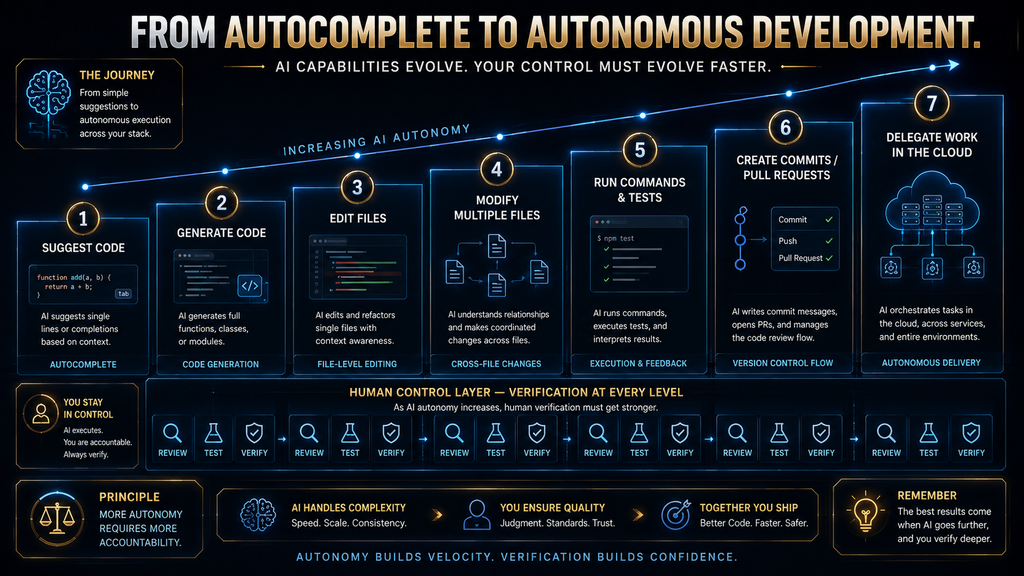
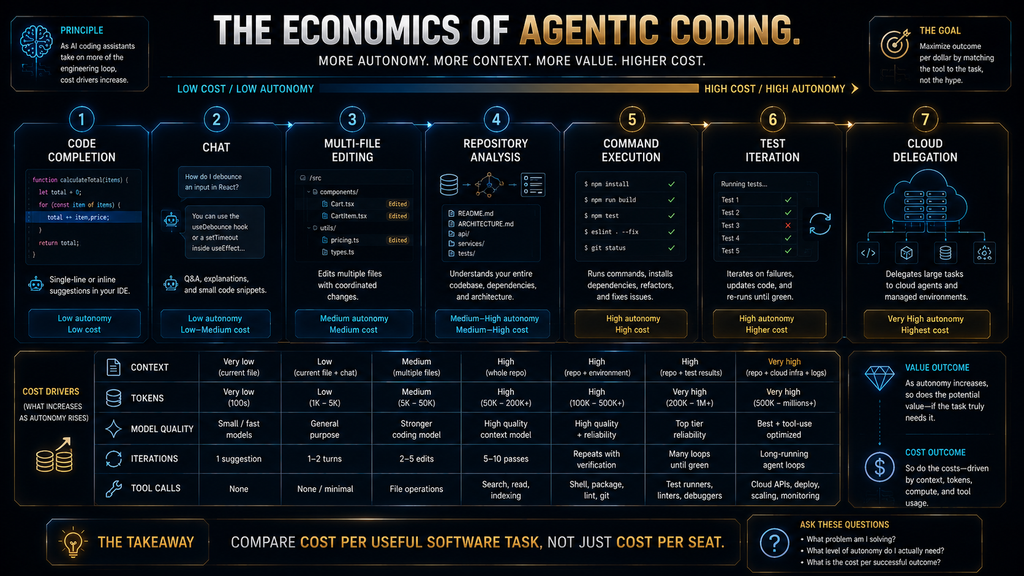
These are different jobs. A useful way to visualize the progression is: Autocomplete → Single-file generation → Context-aware editing → Multi-file changes → Repository-level reasoning → Command execution → Testing and iteration → Pull-request workflows → Delegated/background development. The right tool depends on where you want to stop on that spectrum.
The C.A.S.E. Framework for Choosing an AI Coding Assistant
C — Context
Ask:
What does the AI actually understand about my software?
A model that only sees the current file is fundamentally different from one that can reason across your repository. Context may include:
- current file
- open files
- workspace
- repository
- dependency structure
- documentation
- Git history
- external tools
- private organizational code
Context matters because software rarely exists as isolated functions. A change to one module can break another module, violate an interface, introduce a dependency problem, or contradict an architectural convention.
The more consequential the change, the more valuable project-level context becomes.
A — Autonomy
Ask:
What can the AI do after I give it the task?
A practical autonomy ladder looks like this:
| Autonomy level | Typical capability |
| Level 1 | Suggest code |
| Level 2 | Generate/edit selected code |
| Level 3 | Modify multiple files |
| Level 4 | Run commands and tests |
| Level 5 | Iterate based on test results |
| Level 6 | Create commits or pull requests |
| Level 7 | Work asynchronously in a separate environment |
Not every project needs Level 7. In fact, many teams should deliberately stay closer to Levels 2–5 until they have strong testing, review, permissions, and rollback processes. Autonomy is a capability, not a quality score.
S — Surface
Ask:
Where does the AI fit into the way I already work?
If you spend your day in GitHub and VS Code, Copilot may create less friction than moving to another editor. If you want an AI-first environment, Cursor or Windsurf may make more sense. If you live in the terminal, Claude Code becomes much more attractive.
If you work primarily inside AWS or JetBrains, ecosystem-specific tools can have an advantage. If you want to delegate work into isolated environments, Codex becomes more compelling. The best tool often wins because it is where the developer already wants to work.
E — Economics
Ask:
What happens to my cost when I use the tool heavily?
This question is increasingly important because AI coding pricing is moving away from simple “pay $20 and everything is unlimited” models.
GitHub Copilot uses AI Credits for advanced interactions. Cursor includes model usage and supports additional on-demand usage. Codex uses token-based flexible pricing for additional usage. Claude Code shares usage limits with Claude plans. JetBrains uses AI Credits. Windsurf uses prompt credits.
So the actual cost equation is becoming: Subscription + model usage + agent intensity + task complexity. That is why two developers paying the same headline monthly price can consume radically different amounts of AI capacity.
Free vs. Paid AI Coding Assistants: What Actually Matters?
A free plan is useful only if it supports your real workload.
For example, GitHub Copilot Free provides 2,000 completions per month but limits advanced agentic usage. Amazon Q Developer has a Free tier with limited agentic requests. Cursor’s Hobby plan includes limited agent access. JetBrains AI Free provides a small monthly AI-credit allocation. Cline itself is free, but you still pay for model inference unless you use another free/low-cost model.
The practical question is therefore:
Can I complete a meaningful development workflow without immediately hitting the plan’s constraint?
For a beginner, a free autocomplete tool may be enough. For an experienced developer working on large repositories, the real bottleneck may be agent usage, context size, model access, or execution limits rather than autocomplete. Do not choose a plan because the pricing page says “Free.” Choose it because the free capacity matches your workload.
Why Agentic Coding Changes the Economics
Traditional coding assistance has relatively predictable consumption. You ask:
“Complete this function.”
The AI generates a response. Agentic coding is different. You ask:
“Find why checkout fails for customers using saved payment methods, fix the issue, add regression tests, run the relevant test suite, and show me what changed.”
Now the system may:
- inspect the repository
- search files
- inspect dependencies
- reason about possible causes
- edit several files
- run commands
- inspect errors
- revise the implementation
- run tests again
- summarize the final changes
That is dramatically more model work. This is why modern coding-assistant pricing increasingly uses credits, tokens, prompt credits, model multipliers, or usage pools.
GitHub explicitly notes that a long agent session working across many files can consume more AI Credits than a short lightweight interaction. Cursor similarly explains that model choice is a major determinant of cost and offers usage beyond included allowances.
The second-order effect is important: The better agents become at completing large tasks, the less useful a simple monthly price comparison becomes. Future buyers will increasingly need to compare cost per useful software task, not cost per seat.
Which AI Coding Assistant Is Best for Your Workflow?
| Your situation | Best starting point | Why |
| I want AI inside GitHub and my existing IDE | GitHub Copilot | Broad integration and mature GitHub workflow |
| I want an AI-native IDE | Cursor | AI is central to the editor experience |
| I want another AI-native IDE option | Windsurf | Cascade-centered agentic workflow |
| I prefer the terminal | Claude Code | Terminal-first coding agent |
| I want delegated/cloud coding tasks | OpenAI Codex | Local, IDE, app, and cloud workflows |
| I build heavily on AWS | Amazon Q Developer | Deep AWS ecosystem context |
| I build heavily on Google Cloud | Gemini Code Assist | Google Cloud integrations and enterprise features |
| I use JetBrains every day | JetBrains AI Assistant | Native IDE integration |
| My company has strict privacy/deployment requirements | Tabnine | Enterprise control and deployment options |
| I want model choice and BYOK | Cline | Open, model-flexible agent architecture |
AI Coding Assistant vs. AI Coding Agent
These terms are increasingly used interchangeably, but they should not be. An AI coding assistant generally helps a developer perform coding tasks. An AI coding agent can take a goal, determine a sequence of actions, use tools, modify the project, execute commands, and iterate.
The distinction is about agency, not marketing terminology. A developer asking Copilot:
“Explain this function.”
is using AI assistance. A developer asking an agent:
“Investigate the failing authentication tests, identify the root cause, fix the implementation, update the tests, and run the suite.”
is delegating a software task.
Products increasingly support both modes. GitHub Copilot includes agent capabilities, Cursor has agents and cloud agents, Amazon Q supports agentic coding, Gemini Code Assist has agent mode, Claude Code is explicitly agent-oriented, and Codex is designed around delegated coding work.
This matters because the more agency you give the system, the stronger your verification process needs to become.
The Hidden Cost of AI-Generated Code
The most dangerous assumption is:
“If AI writes code faster, software development automatically becomes faster.”
Not necessarily. Consider a developer who generates 5,000 lines of code quickly but then spends days debugging subtle problems, correcting architecture, reviewing dependencies, and removing unnecessary complexity. The output increased.
The useful software did not necessarily increase at the same rate. AI-generated code can create:
- incorrect assumptions
- hallucinated APIs
- outdated library usage
- unnecessary abstractions
- duplicated logic
- security vulnerabilities
- poor error handling
- hidden dependencies
- tests that merely validate the generated implementation rather than the intended behavior
This is why verification should be part of the workflow rather than an afterthought.
The vendors themselves recognize this. AWS tells users to review Amazon Q suggestions before accepting them, and Google explicitly warns that Gemini Code Assist can generate plausible but incorrect output and recommends validating the results.
The best AI coding workflow is therefore not: AI → production. It is: AI → inspect → test → review → verify → production.
A Practical AI Coding Workflow That Actually Works
Start with bounded tasks rather than giving an agent unlimited authority over an unfamiliar production system.
For a new feature, begin by asking the assistant to inspect the relevant architecture and explain the files it believes are involved. This creates an opportunity to catch a bad assumption before code changes begin.
Next, ask for a plan. A useful plan should identify the files likely to change, dependencies that may be affected, tests that should be added or modified, and any assumptions the agent is making.
Only then allow implementation.
After the code changes, run tests independently. Do not assume that because an AI agent says “all tests pass,” the software is correct. Review the actual test scope, inspect the diff, check whether important edge cases are covered, and verify that the implementation matches the original requirement.
For high-consequence software, the human review boundary should become stricter as AI autonomy increases. A useful operating rule is:
The more authority you give AI, the more evidence you should require before accepting its work.
When You Should Not Use an AI Coding Assistant
AI assistance is not automatically valuable for every development task.
If you are learning programming fundamentals, relying on autocomplete for every exercise can hide the reasoning you actually need to learn. AI can explain a solution, but if it always supplies the solution before you struggle with the problem, your learning process changes.
If you are working on highly sensitive code and your organization has not approved the AI provider, do not simply install a coding assistant and start pasting proprietary repositories into it. Data handling, retention, training policies, deployment location, access control, and contractual terms can matter more than model quality.
If a change is extremely small, manual implementation may be faster than constructing a large agent context. And if the task requires deep architectural judgment, AI should generally be treated as an analytical collaborator rather than the final authority. The right question is not:
“Can AI do this?”
It is:
“Does using AI here improve the total engineering outcome after generation, verification, review, maintenance, and risk are included?”
Privacy and Code Security: What Developers Should Check
Before adopting an AI coding assistant for proprietary software, review the provider’s actual data policy rather than relying on generic claims such as “enterprise security.” Check:
- whether code is retained
- whether customer code is used for model training
- where processing occurs
- whether administrators can control access
- whether the product supports private deployment
- whether data retention can be configured
- whether prompts and outputs are logged
- whether external tools can access repositories
- whether agents can execute shell commands
- whether MCP servers introduce additional data paths
This becomes especially important with agentic systems because the security boundary is no longer limited to generated text. An agent may have permission to:
- read files
- modify files
- run commands
- access package managers
- call APIs
- interact with Git
- access external services
Every additional permission expands the potential blast radius of an incorrect instruction or compromised workflow. Tabnine’s deployment model is specifically relevant for organizations that need SaaS, VPC, on-premises, or air-gapped options.
AWS also distinguishes data handling between Amazon Q Developer Free and Pro tiers, while Google provides separate enterprise security and governance capabilities for Gemini Code Assist Standard and Enterprise. Security should therefore be evaluated as part of the tool architecture, not as a footnote on the pricing page.
Common Mistakes When Choosing an AI Coding Assistant
Choosing the most popular tool instead of the right environment
Popularity does not tell you whether a terminal agent, AI-native IDE, GitHub-integrated assistant, or enterprise coding platform fits your workflow.
Comparing only autocomplete quality
Autocomplete is increasingly commoditized. Repository context, agent capability, testing, integrations, governance, and cost can matter more.
Ignoring usage-based pricing
A $20 subscription can become a different economic proposition when advanced agentic work consumes additional credits or model usage.
Giving agents too much authority too early
Start with bounded tasks, explicit plans, reviewable diffs, and controlled execution.
Treating AI output as verified code
Generated code is a proposal until it has passed appropriate tests and review.
Ignoring the existing development environment
Switching editors can create real friction. Sometimes the best AI coding assistant is the one that works well inside the IDE your team already uses.
Using a consumer product for enterprise code without approval
Security and privacy requirements should be established before code enters the system, not after an incident.
Assuming more autonomy means more productivity
Autonomy can reduce repetitive work, but it can also increase review and debugging costs if the system makes poor assumptions.
The Best AI Coding Assistant Is Really a Workflow Decision
The market is increasingly difficult to compare because the products are becoming more capable while also becoming more different.
GitHub Copilot is strong when the developer wants AI integrated with GitHub and existing development tools. Cursor and Windsurf are better understood as AI-native environments. Claude Code is a terminal-first agent. Codex spans local, IDE, application, and cloud-based delegation. Amazon Q and Gemini Code Assist gain strategic value when their cloud ecosystems are already part of the stack. JetBrains AI Assistant wins from native IDE integration, while Tabnine competes on enterprise control and Cline competes on model flexibility.
That means the old question—
“Which AI coding assistant is the best?”
—is becoming less useful. A better question is:
“Which AI development workflow do I want to build around?”
Once you answer that, the shortlist becomes much smaller.
Best AI Coding Assistants by Developer Type
For beginners
Start with GitHub Copilot or another IDE-integrated assistant that lets you inspect suggestions and learn from them rather than handing over complete development tasks immediately. The objective at this stage should be learning the reasoning behind the code, not maximizing autonomous output.
For professional developers
Consider GitHub Copilot, Cursor, Claude Code, or Codex depending on whether your workflow is GitHub/IDE-first, AI-native, terminal-first, or delegation-oriented.
For large repositories
Prioritize tools with strong repository context and agentic capabilities, but increase your testing and review discipline at the same time.
For AWS teams
Start with Amazon Q Developer because the AWS context can be more valuable than generic model capability.
For Google Cloud teams
Evaluate Gemini Code Assist Standard or Enterprise, especially when private code customization and Google Cloud integration matter.
For JetBrains developers
JetBrains AI Assistant is the natural first comparison because it keeps AI inside the environment where the team already works.
For privacy-sensitive organizations
Evaluate Tabnine alongside your security and deployment requirements rather than choosing purely on model performance.
For technically advanced users
Cline becomes interesting when you want to choose your own model providers and control inference economics.
What Happens If You Do Nothing?
It is easy to treat AI coding assistants as optional productivity software.
For an individual developer, that may be reasonable. But the strategic question changes when competitors and engineering teams begin using agents to automate repository analysis, testing, refactoring, documentation, and routine implementation.
The risk of doing nothing is not simply “you will write code more slowly.” It may be that the development process itself becomes less competitive. A team that spends hours manually handling repetitive software maintenance while another team delegates much of that work to supervised agents can eventually operate with very different engineering economics.
But there is an equally important risk on the other side: adopting AI without governance can create faster production of technical debt. The correct strategy is therefore neither “automate everything” nor “ignore AI.” It is:
Automate repeatable work. Preserve human judgment at consequential boundaries.
That is the position AI Hustle World should take.
The Future of AI Coding Assistants
The direction of travel is clear: AI coding assistants are moving from code generation toward software execution. The next generation of systems will increasingly understand repositories, issue trackers, documentation, CI/CD systems, databases, cloud environments, testing infrastructure, and development policies. That means the primary interface may eventually become less about:
“Write this function.”
and more about:
“Here is the outcome I need. Investigate the system, propose a plan, make the changes, test them, and show me the evidence.”
The development bottleneck then moves. Writing code becomes less scarce. Specification, architecture, verification, testing, security, and judgment become more important.
This is a second-order effect worth paying attention to. If AI makes implementation dramatically cheaper, the value of knowing exactly what should be built and how you will prove it works increases.
That is why developers should not measure the success of an AI coding assistant only by lines of code generated. Better metrics include:
- time from issue to verified fix
- review time
- escaped defects
- test coverage
- rework rate
- time spent on repetitive maintenance
- developer interruption rate
- cost per completed software task
- percentage of AI-generated changes accepted after review
Those metrics tell you whether AI is actually improving engineering.
Our Verdict
There is no universal winner, but the current market has clear leaders by workflow.
GitHub Copilot is the strongest general-purpose starting point for developers who want AI integrated with GitHub and their existing IDE. Its current platform extends well beyond autocomplete into agent mode, cloud agents, CLI, code review, and broader GitHub workflows.
Cursor is one of the strongest choices for AI-native development, particularly if you want the editor itself to revolve around agents, model selection, cloud agents, MCP, and AI-driven workflows. Claude Code is the better fit for terminal-first developers who want to delegate complex repository work while staying close to the command line. OpenAI Codex is particularly compelling for delegated development, because it can work through local tools and IDEs while also supporting cloud-based tasks, parallel agents, testing, and code review.
Windsurf is a strong AI-native IDE alternative, while Amazon Q Developer becomes more compelling when AWS is central to the stack. Gemini Code Assist is best considered in its current organizational form for Google Cloud development rather than relying on outdated consumer-plan comparisons. JetBrains AI Assistant is the logical choice for developers already committed to JetBrains IDEs, while Tabnine stands out when enterprise deployment and privacy controls are central requirements.
And Cline is one of the most interesting choices for technically sophisticated developers who want an open, permission-controlled, model-flexible agentic workflow. The most important takeaway is this:
The best AI coding assistant isn’t the one that generates the most code. It’s the one that gives you enough context and autonomy to remove meaningful engineering work while keeping cost, verification, and human control within acceptable boundaries.
Final Thoughts
AI coding assistants are no longer a single category of autocomplete products.
They are becoming development environments, coding agents, repository analysts, testing partners, cloud workers, and software-delivery systems. That creates enormous potential, but it also makes simplistic comparisons increasingly misleading.
If you want AI integrated into the workflow you already have, start with GitHub Copilot. If you want an AI-native editor, compare Cursor and Windsurf. If you prefer the terminal, Claude Code is a natural fit. If you want to delegate larger development tasks across local and cloud environments, evaluate OpenAI Codex. AWS-heavy teams should examine Amazon Q Developer, while Google Cloud organizations should look at Gemini Code Assist. JetBrains developers have a strong native option in JetBrains AI Assistant, security-sensitive organizations should evaluate Tabnine, and technically advanced users who want model flexibility should consider Cline.
But don’t choose based on the tool with the longest feature list. Choose based on the development workflow you want to create.
The real competitive advantage of AI coding is not simply writing code faster. It is creating a development system where repetitive work is delegated, important decisions remain visible, and every significant AI-generated change can still be tested, reviewed, and trusted.
Use AI to compress the mechanical parts of engineering. Keep humans responsible for the parts where correctness, security, architecture, and judgment matter most.
Choose the AI Tool That Solves the Right Problem
Before choosing a tool, see how AI coding assistants work and where they help most.
Understand How AI Coding Assistants Work →FAQ
What is the best AI coding assistant overall?
For most developers, GitHub Copilot is the safest general-purpose starting point because it integrates with GitHub and a wide range of IDEs while now supporting agentic workflows. Developers who want an AI-native environment should compare Cursor and Windsurf, while terminal-oriented developers should look at Claude Code.
Is there a free AI coding assistant?
Yes. GitHub Copilot has a Free plan, Cursor has a free Hobby plan, Windsurf has a Free plan, Amazon Q Developer has a Free tier, JetBrains AI Assistant has AI Free, and Cline’s client is free while users pay for model inference. Codex is currently available across ChatGPT plans, including Free and Go, with usage limits.
Is Cursor better than GitHub Copilot?
Not universally. Cursor is better suited to developers who want an AI-native IDE and extensive agentic workflows. Copilot is better suited to developers who want AI integrated with existing IDEs and GitHub. The better choice depends on whether you value an AI-first environment or minimal workflow disruption.
Is Claude Code an IDE?
No. Claude Code is primarily a terminal-based coding agent, although Anthropic’s ecosystem supports broader integrations. Its core workflow is different from an AI-native IDE such as Cursor or Windsurf.
Is OpenAI Codex a coding assistant?
Codex is better described as an AI coding agent. It can write and review code, navigate repositories, edit files, run commands and tests, and work in cloud environments. It can also operate through terminal, IDE, web, and the Codex application.
Is Amazon Q Developer only for AWS?
No. Amazon Q Developer can assist with general software development, but its strongest differentiation is its understanding of AWS applications, architecture, resources, documentation, and cloud workflows. It supports IDE and CLI workflows as well.
Is Gemini Code Assist still free for individuals?
The old consumer Gemini Code Assist workflow changed in June 2026. Google states that Gemini Code Assist IDE extensions and Gemini CLI stopped serving requests for individual, Google AI Pro, and Google AI Ultra tiers on June 18, 2026, with affected users directed to Antigravity. Gemini Code Assist Standard and Enterprise remain available for organizations.
Which AI coding assistant is best for JetBrains?
JetBrains AI Assistant is the most natural first option because it is integrated directly into JetBrains IDEs and supports AI features and coding agents within that environment.
Which AI coding assistant is best for privacy?
Tabnine is one of the strongest candidates when privacy, deployment flexibility, and enterprise governance are primary requirements. Its current platform supports SaaS, VPC, on-premises, and air-gapped deployment options.
Can AI coding assistants replace programmers?
No. They can automate increasingly large portions of implementation, debugging, testing, documentation, and software maintenance, but humans remain responsible for requirements, architecture, verification, security, risk management, and consequential technical decisions.
Are AI coding assistants safe?
They can be useful safely when deployed with appropriate permissions, review processes, testing, privacy controls, and organizational policies. The more autonomous the agent, the more important those controls become. AI-generated code should be treated as unverified until it has passed the appropriate engineering checks.
Related Guides
- 7 Best ChatGPT Alternatives in 2026: Free & Paid Compared
- Best AI Email Assistants (Free & Paid): 10 Tools Compared
- How AI Website Builders Work: A Beginner’s Guide
- How to Review AI-Generated Code for Bugs and Security Risks
- How to Generate and Maintain Software Tests With AI
Written by
Muntasir Ahmad Chowdhury
Founder, AI Hustle World
Muntasir Ahmad Chowdhury is the Founder of AI Hustle World, an independent publication dedicated to making Artificial Intelligence practical, trustworthy, and easy to understand. He researches AI tools, automation, customer service, productivity, and real-world business applications, helping readers make smarter technology decisions through research-driven, experience-backed content.
Expertise:
AI Tools • AI Automation • AI Customer Service • AI Productivity • Generative AI • AI Workflows
Get Smarter With AI
Enjoyed this guide? Get practical AI tools, tutorials, and honest reviews delivered to your inbox.
3 thoughts on “Best AI Coding Assistants (Free & Paid): Top 10 Tools Compared”