Last Updated: Late August 2026
Best AI Customer Service Tools in 2026 (Free & Paid): Top 10 Compared
Customer-service AI has moved well beyond the old chatbot model of answering a few frequently asked questions. The strongest platforms in 2026 can retrieve information, understand intent, recommend or execute actions, resolve routine issues, assist human agents, and escalate conversations when the situation requires judgment.
That shift makes choosing an AI customer-service tool more difficult than simply comparing feature lists. A small ecommerce store, a SaaS company with a large knowledge base, and an enterprise contact center may all need “AI customer service,” but they do not need the same type of system.
This guide compares the leading options by what the AI actually does, where the platform fits, how pricing works, how much automation it can support, where humans remain necessary, and what kind of business should realistically choose it.
The most important conclusion is simple: the best AI customer-service platform is not the one that automates the most conversations. It is the one that safely resolves the right conversations at a sustainable cost.
Quick answer: For most established support teams, Zendesk AI is the strongest all-around option; Intercom Fin is particularly compelling for SaaS and product-led businesses; Freshdesk Freddy AI offers strong value; Gorgias is especially strong for ecommerce; Tidio Lyro works well for smaller teams; and HubSpot Breeze Customer Agent makes the most sense when customer service already lives inside HubSpot.
What Makes an AI Customer Service Tool Good in 2026?
A good AI customer-service tool should do more than generate convincing replies. It should connect customer conversations with trustworthy knowledge, support the right channels, understand when it can solve an issue, perform authorized actions where appropriate, and transfer difficult cases to humans with enough context to avoid making the customer start over.
That is why “AI chatbot” is now an incomplete description of the market. Some products are primarily help desks with AI built into them. Others are AI agents designed to resolve conversations. Some are ecommerce support systems with deep store integrations, while others are CRM-centered platforms where customer-service AI operates on top of customer records and business data.
The difference matters because the software architecture around the AI often determines its usefulness more than the language model itself.
A brilliant model with poor knowledge, weak permissions, no useful integrations, and bad escalation rules can create more support work instead of less.
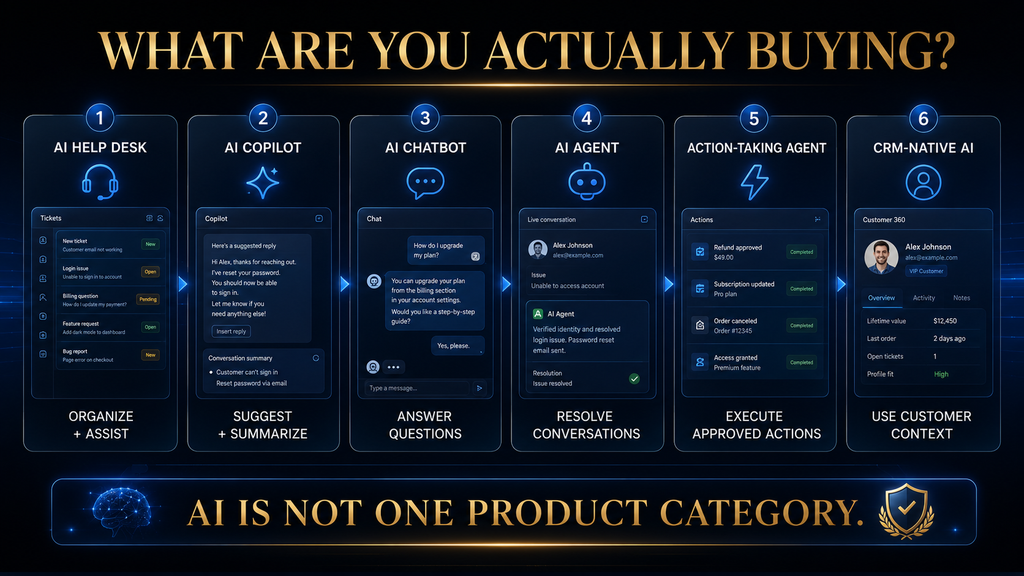
The C.A.R.E. framework
To compare these platforms consistently, use four questions:
| Criterion | What to ask |
|---|---|
| Coverage | Does it support the channels, customer journeys, and workflows you actually need? |
| Automation | Can it resolve meaningful work, or does it mainly draft answers? |
| Reliability | Can customers trust the information, and does the system know when to escalate? |
| Economics | What will the platform and AI actually cost at your support volume? |
This is more useful than giving every product an arbitrary 9.8/10 score. A tool can be excellent for enterprise support and completely wrong for a three-person startup.
The 10 Best AI Customer Service Tools in 2026
| Tool | Best for | AI model | Pricing approach | Main strength |
|---|---|---|---|---|
| Zendesk AI | Established support teams | AI agents + agent assistance | Seats + AI resolution usage | Complete support operation |
| Intercom Fin | SaaS and product-led companies | AI agent | Outcome-based | Conversational resolution |
| Freshdesk Freddy AI | SMB and growing teams | AI agent + copilot | Seats + AI sessions | Value and help-desk depth |
| HubSpot Breeze Customer Agent | CRM-first businesses | AI customer agent | Seats + HubSpot credits | CRM context |
| Gorgias AI Agent | Ecommerce | AI agent + store actions | Platform + resolved interactions | Ecommerce workflows |
| Tidio Lyro | Small businesses | AI agent | Platform + AI conversations | Accessibility and simplicity |
| Zoho Desk + Zia | Budget-conscious businesses | AI assistance + agents | Zoho subscription + model usage | Ecosystem value |
| Help Scout AI Answers | Human-first support teams | Knowledge-based AI | Platform + resolutions | Simplicity and human handoff |
| Ada | Complex enterprise support | Agentic AI | Custom | Deep automation |
| Salesforce Agentforce | Large CRM-centric organizations | Agentic AI | Usage or per-user models | CRM + enterprise orchestration |
Pricing and feature structures change frequently, so treat the figures below as a snapshot of the vendors’ published 2026 pricing rather than a permanent price guarantee.
1. Zendesk AI — Best Overall for Mature Support Operations
Zendesk is the strongest all-around choice when customer service is already a serious operational function rather than a simple website chat widget.
Its advantage is not just its AI. Zendesk combines ticketing, messaging, email, voice, live chat, reporting, integrations, a unified agent workspace, knowledge management, and AI agents into one support environment. Its current AI agents can interact across messaging and email and can perform authorized actions in connected systems.
That distinction matters. A business with thousands of customer conversations does not only need an AI that can answer questions. It needs somewhere to route, record, prioritize, escalate, measure, and manage those conversations.
Zendesk’s AI agents are measured through automated resolutions, and Zendesk has been evolving its pricing model around resolution allowances and resolution tiers rather than treating AI as an unlimited free feature.
The platform’s traditional pricing is also seat-based. Zendesk’s published pricing documentation lists Support plans from $19 per agent/month annually for Support Team, while Suite plans begin at $55 per agent/month annually for Suite Team; higher tiers cost more.
Why Zendesk stands out
The real advantage is the combination of AI automation and support infrastructure. If an AI agent resolves a repetitive issue but the customer needs a human for an unusual problem, the organization already has the ticketing, routing, agent workspace, and reporting system around that interaction.
Zendesk is therefore particularly strong for companies that have moved beyond “we need a chatbot” and toward “we need a scalable customer-service operating system.”
The trade-off
Zendesk can be more platform than a small business needs. The cost is not simply the AI; it is the broader support stack, agent seats, configuration, integrations, and potentially additional AI usage.
A five-person company with a modest ticket volume may get more practical value from Freshdesk, Tidio, Help Scout, or Zoho.
Best for
Choose Zendesk if: you have a real support team, multiple channels, significant ticket volume, complex routing, or plans to scale AI automation.
Avoid it if: your only requirement is a simple website chatbot.
Verdict: Best overall for mature support operations.
2. Intercom Fin — Best for SaaS and Product-Led Support
Intercom Fin is one of the clearest examples of where customer-service AI is heading: away from a chatbot that simply generates responses and toward an agent that can resolve customer work.
Fin can operate with Intercom or, in some configurations, alongside an existing help desk. Intercom currently lists Fin at $0.99 per outcome, with outcomes including resolutions, procedure handoffs, and disqualifications.
That pricing model is important because it changes the question from:
“How much does the chatbot cost?”
to:
“How much am I paying for useful AI outcomes?”
Intercom defines a resolution as a conversation where no further help is requested after the final AI answer. It also counts a successfully completed configured procedure that ends in a handoff as an outcome.
Fin can also be used with external help desks, including systems such as HubSpot, Freshdesk, and Salesforce, at the published outcome price, although specific configurations and minimum commitments apply.
Why Fin stands out
Intercom’s biggest advantage is the way AI is integrated into the customer conversation itself.
This is especially useful for SaaS businesses where customers ask questions such as:
- How do I configure this feature?
- Why isn’t my integration working?
- How do I change my subscription?
- Where can I find this setting?
- What does this feature do?
- Can I complete this task?
These are not always simple FAQ questions. They require understanding the customer’s intent and sometimes guiding or executing a procedure.
The economics are also interesting
Outcome-based pricing can be attractive because you are not paying the AI simply for existing.
But there is a catch: a low price per successful outcome does not automatically mean low total cost. You still need to account for the underlying Intercom subscription, seats where applicable, message/voice costs, configuration, and the percentage of conversations that actually become useful outcomes.
The trade-off
Fin is most compelling when the company has a strong knowledge base and a support model that fits conversational automation. It is less compelling if the business mainly needs a traditional ticketing system without much conversational interaction.
Best for
Choose Fin if: you run SaaS, a product-led business, or a digital service where many support interactions revolve around product usage.
Avoid it if: your operation primarily needs basic ticket management and little AI automation.
Verdict: One of the strongest AI-first choices for SaaS support.
3. Freshdesk Freddy AI — Best Value for Growing Support Teams
Freshdesk sits in an attractive middle ground between lightweight support software and enterprise-grade service platforms.
Its current Freshdesk plans start at $19 per agent/month billed annually for Growth, $55 for Pro, and $89 for Enterprise. Each includes the first 500 Freddy AI Agent sessions, with additional AI-agent sessions priced at $49 per 100 sessions.
That structure makes Freshdesk particularly interesting for companies that want AI without immediately moving into a much heavier enterprise platform.
Freddy AI can assist with customer-service work while the help desk continues handling ticketing, knowledge bases, routing, reporting, and team collaboration. The higher tiers add capabilities such as intelligent routing, multilingual support, custom reporting, and additional AI features.
Why it stands out
Freshdesk’s biggest strength is value density.
A growing company can get:
- ticketing;
- shared inbox functionality;
- knowledge management;
- customer portals;
- AI agents;
- routing;
- reporting;
- agent assistance;
without immediately adopting a heavyweight enterprise stack.
That makes it particularly attractive when the support organization is growing faster than the budget.
The trade-off
The pricing model requires attention to usage. The base subscription is only part of the AI economics because additional AI-agent sessions and other add-ons can increase the bill.
There is also a strategic question: if your organization eventually requires sophisticated multi-system agent orchestration, you may outgrow a simpler deployment.
Best for
Choose Freshdesk if: you want a capable help desk plus AI and care about value.
Avoid it if: your support operation requires highly specialized enterprise orchestration from day one.
Verdict: One of the strongest value-oriented choices in the market.
4. HubSpot Breeze Customer Agent — Best for CRM-First Businesses
HubSpot becomes much more compelling when customer service cannot be separated from the rest of the customer relationship.
Its Service Hub pricing currently starts at $7 per seat/month for Starter, with Professional starting at $90 per seat/month and Enterprise at $150 per seat/month. HubSpot also uses HubSpot Credits for certain AI functions.
The Customer Agent currently consumes 50 HubSpot Credits per resolved conversation, and HubSpot says the agent can resolve inquiries and escalate when necessary.
That credit-based architecture is important because HubSpot is not simply selling a chatbot. It is attaching AI to a broader CRM and customer-data ecosystem.
Why it stands out
Imagine a customer asks:
“Can I change my plan?”
The ideal AI response may depend on:
- the customer’s current plan;
- account status;
- previous interactions;
- lifecycle stage;
- eligibility rules;
- sales ownership;
- billing information.
A CRM-native system can potentially use much more context than a standalone chatbot.
That makes HubSpot particularly attractive for businesses already using HubSpot as their central customer platform.
The trade-off
HubSpot becomes expensive if you adopt it solely for customer-service AI while ignoring the broader CRM value.
The platform is strongest when the company already wants the HubSpot ecosystem.
Best for
Choose HubSpot if: your sales, marketing, CRM, and support operations already live together.
Avoid it if: you only want a standalone support platform and have no need for HubSpot’s broader ecosystem.
Verdict: Best CRM-first customer-service AI option for HubSpot-centric businesses.
5. Gorgias AI Agent — Best for Ecommerce
Gorgias is one of the clearest examples of why industry context matters.
A generic support platform might know that a customer is asking about an order. Gorgias is designed around ecommerce workflows where order status, returns, refunds, shipping, product information, and customer history are central to the support interaction.
Gorgias currently prices its AI Agent primarily by resolved interaction. Most plans use $0.90 per AI-resolved interaction on annual billing, with Starter plans beginning at $1 per resolved interaction. The company says AI Agent is charged only when it fully resolves a conversation without human intervention.
Gorgias also positions its platform specifically around ecommerce and says its help desk scales based on ticket volume rather than per-agent pricing.
Why it stands out
Consider a typical ecommerce queue:
Where is my order?
Can I return this?
What’s my order status?
Can I change my shipping address?
Is this product available?
These questions are repetitive, but they are also action-oriented.
The best AI system therefore needs more than a knowledge base. It needs access to the right store information and the ability to perform approved actions.
Gorgias is strong precisely because its product is designed around that context.
The trade-off
Gorgias makes much more sense for ecommerce than for a general B2B support operation.
A SaaS company with complex product documentation may find Intercom or Zendesk more appropriate.
Best for
Choose Gorgias if: you run Shopify or another ecommerce operation with high volumes of repetitive customer questions.
Avoid it if: ecommerce is not your core business model.
Verdict: Best specialist choice for ecommerce customer support.
6. Tidio Lyro — Best for Small Businesses
Tidio takes a more approachable route.
Its current pricing includes a Starter plan at $24.17/month when billed annually, with Growth starting at $49.17/month. Lyro can also be purchased separately, with the current standalone AI-agent pricing starting at $32.50/month for 50 Lyro conversations.
Tidio says Lyro can handle repetitive customer questions and supports human handoff. The vendor currently claims that Lyro can solve up to 67% of customer problems; that number should be treated as a vendor claim, not a universal benchmark.
Why it stands out
Tidio is easier to understand than many enterprise platforms.
A small business can think about its support system in simple terms:
AI handles repetitive conversations. Humans handle everything else.
That simplicity is valuable.
A small online store does not necessarily need an elaborate enterprise service architecture to answer:
- shipping questions;
- opening hours;
- product questions;
- basic returns;
- common policies;
- routine support requests.
The trade-off
Usage-based AI economics become increasingly important as conversation volume grows.
A small business with a few hundred AI conversations can have a very different cost structure from a company handling tens of thousands.
Best for
Choose Tidio if: you are a small business that wants to introduce AI without building a complicated support operation.
Avoid it if: you need deep enterprise governance, highly complex workflows, or large-scale contact-center orchestration.
Verdict: One of the easiest starting points for SMB customer-service AI.
7. Zoho Desk + Zia — Best Budget/Ecosystem Option
Zoho’s advantage is not that it has the flashiest AI demo. Its advantage is that AI sits inside a broad business-software ecosystem.
Zia can support customer-service workflows including ticket categorization, summaries, sentiment analysis, response assistance, knowledge generation, and AI-agent functionality. Zoho’s current Zia Agents model also allows agents to use Zoho-hosted models or external models through connected API keys.
One interesting characteristic is that Zoho says Zia Agents themselves are free, while the underlying model usage can vary depending on whether you use Zoho-hosted models or external models.
Why it stands out
This creates an unusual economic proposition.
Instead of treating AI as a separate expensive layer, Zoho can make sense when a business already uses:
- Zoho CRM;
- Zoho Desk;
- Zoho Books;
- Zoho Analytics;
- other Zoho applications.
The more of the ecosystem you use, the more valuable the integration becomes.
The trade-off
The downside is complexity of another kind: ecosystem commitment.
If you only want customer-service software, Zoho’s broader platform may not matter.
If you already use Zoho extensively, however, the calculation changes.
Best for
Choose Zoho if: you want strong business-software integration and value-conscious AI automation.
Avoid it if: you want the simplest standalone customer-service experience possible.
Verdict: A strong value choice, particularly inside the Zoho ecosystem.
8. Help Scout AI Answers — Best for Human-First Support
Help Scout takes a different philosophical position.
Instead of trying to turn customer support into an autonomous machine, it emphasizes a simpler support experience with AI assistance and easy human access.
Its AI Answers system uses the organization’s website and Docs knowledge base to answer customer questions. Help Scout explicitly provides a path to human help when AI cannot resolve the issue.
After its three-month trial, Help Scout currently charges $0.75 per AI resolution, with one resolution counted per session.
Why it stands out
The simplicity is the product.
For a team that wants:
- a clean support inbox;
- a strong knowledge base;
- human agents;
- lightweight AI self-service;
Help Scout can be more sensible than buying a much larger AI platform.
This is particularly relevant because customers increasingly care about access to humans. Gartner’s August 2026 research found that 87% of surveyed customers said companies using GenAI for customer service should provide access to a human agent.
That makes human handoff more than a technical feature. It is part of the customer experience.
The trade-off
Help Scout is not the obvious choice if your goal is maximum autonomous action-taking.
Its strength is AI-assisted, human-centered service, not maximum automation.
Best for
Choose Help Scout if: customer relationships are personal and your team wants AI to reduce repetitive work without making support feel robotic.
Avoid it if: your primary objective is aggressive autonomous resolution at enterprise scale.
Verdict: Excellent for human-first support teams.
9. Ada — Best for Complex Enterprise AI Automation
Ada represents the more advanced end of the market.
Its platform is designed around agentic customer experience, with support for channels such as voice, email, chat, SMS, and social, plus workflows and actions designed to move beyond simple question answering. Ada’s 2026 product direction emphasizes multi-step customer workflows and more autonomous resolution.
The important distinction is that Ada is not primarily trying to be a lightweight help desk.
It is closer to an AI automation layer for complex customer-service operations.
Why it stands out
Suppose a customer needs to:
- authenticate;
- change an account;
- trigger a business workflow;
- receive confirmation;
- escalate if an exception occurs.
A basic chatbot may explain how to perform those steps.
An agentic system aims to perform the approved steps.
That is where the market is heading.
The trade-off
This sophistication comes with implementation requirements.
You need:
- reliable business rules;
- clean knowledge;
- appropriate permissions;
- integrations;
- monitoring;
- escalation logic;
- governance.
Ada uses custom pricing rather than a simple public SMB price.
Best for
Choose Ada if: you have complex support operations and want substantial autonomous workflow execution.
Avoid it if: you are a small business with simple FAQ-level support needs.
Verdict: A serious enterprise option for agentic customer service.
10. Salesforce Agentforce — Best for Salesforce-Centric Enterprises
Salesforce Agentforce belongs in the conversation for a simple reason: many large businesses already run customer data and service operations inside Salesforce.
Agentforce uses multiple pricing models. Salesforce currently lists Flex Credits at $500 per 100,000 credits and Conversations at $2 per conversation, while also offering per-user licensing for some service configurations.
Salesforce also lists Agentforce for Service at $125 per user/month in its current service AI pricing, while additional service and contact-center products have their own pricing.
Why it stands out
The major advantage is the relationship between:
CRM data + service workflows + AI agents + business processes.
If the customer’s support history, account data, cases, products, sales information, and workflows already exist in Salesforce, the AI can operate within a much richer business context than a standalone support bot.
The trade-off
Salesforce is rarely the tool you buy because you want the cheapest chatbot.
It is an enterprise platform decision.
The complexity, licensing, implementation, and governance requirements make it excessive for many small teams.
Best for
Choose Salesforce Agentforce if: your organization is already deeply invested in Salesforce and wants AI embedded into its service operation.
Avoid it if: you are starting from scratch and simply need an affordable support platform.
Verdict: One of the strongest enterprise choices for Salesforce-centered organizations.
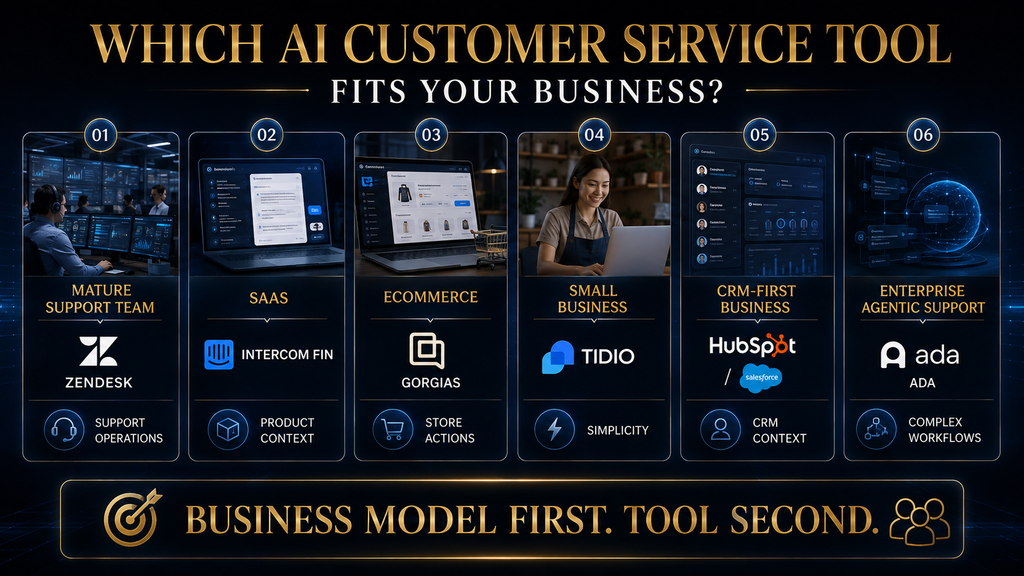
Which AI Customer Service Tool Is Best for Your Business?
There is no universal winner because the underlying support models are different.
The better question is:
What kind of support operation are you trying to build?
Best for enterprise support
Zendesk AI, Salesforce Agentforce, or Ada
Choose based on your existing infrastructure. Zendesk is the more support-native choice, Salesforce makes sense for Salesforce-centric organizations, and Ada is particularly interesting when autonomous workflows are the priority.
Best for SaaS
Intercom Fin
SaaS support frequently revolves around product usage, feature education, integrations, subscriptions, and troubleshooting. Fin’s conversational and outcome-based model fits that environment well.
Best for ecommerce
Gorgias
If your support queue is dominated by orders, returns, shipping, product questions, and store-related actions, ecommerce-specific context matters more than having the longest general-purpose feature list.
Best for small businesses
Tidio Lyro or Freshdesk
Tidio is easier to start with. Freshdesk provides a deeper help-desk structure as the support organization grows.
Best for CRM-first companies
HubSpot Breeze Customer Agent or Salesforce Agentforce
If your customer information already lives inside the CRM, keeping AI close to that context can be more valuable than adding a disconnected support platform.
Best for human-first teams
Help Scout
If your support model depends on personal service and the AI’s role is primarily to remove repetitive questions, Help Scout is a strong fit.
Best budget/ecosystem option
Zoho Desk + Zia
Especially compelling when the organization already uses Zoho products.
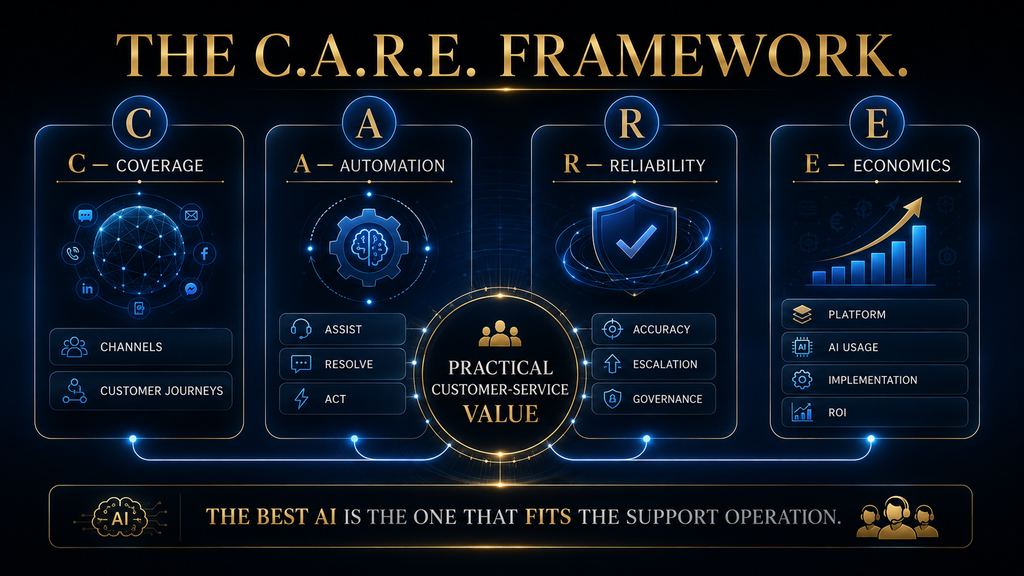
The Real Difference Between AI Agents, AI Copilots and AI Help Desks
One of the easiest mistakes is comparing these products as though “AI” means the same thing everywhere.
It doesn’t.
AI help-desk functionality
The AI helps organize and manage support:
- summarize tickets;
- categorize requests;
- suggest replies;
- identify sentiment;
- retrieve knowledge;
- route tickets.
The human still performs most of the customer interaction.
AI copilot
The AI works beside the human agent.
For example, an agent receives a complicated customer email. The copilot might retrieve the relevant policy, summarize the customer’s history, suggest a response, and identify the next action.
The human remains responsible for the final answer.
AI agent
The AI interacts directly with the customer and may resolve the issue without human intervention.
The important word is resolve.
An AI generating an answer is not automatically an AI resolving a problem.
Action-taking AI agent
This is the next level.
The AI can potentially:
- retrieve customer data;
- update records;
- change subscriptions;
- initiate refunds;
- execute workflows;
- schedule actions;
- escalate with context.
This is where AI customer service starts producing operational leverage rather than merely reducing typing.
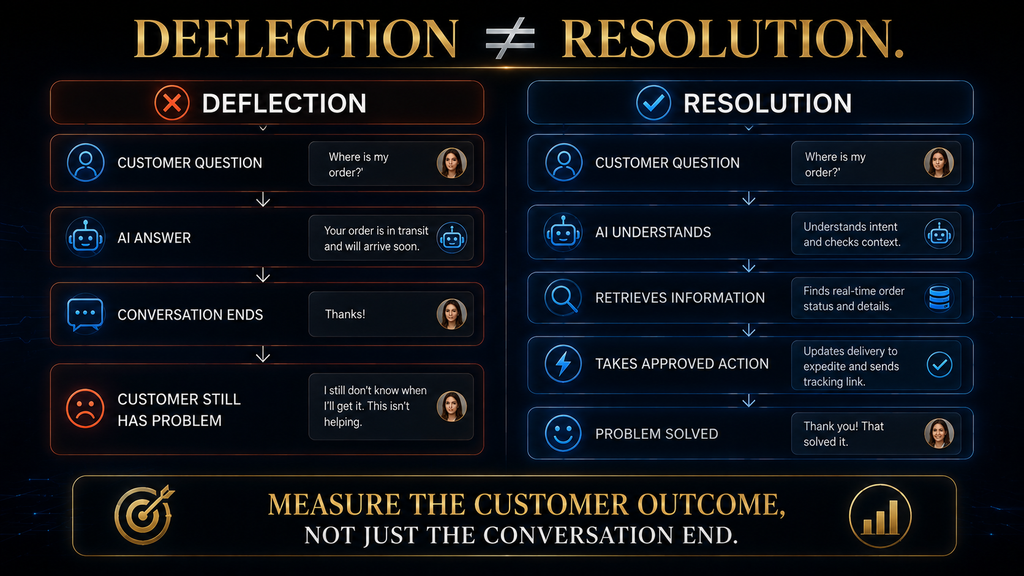
Why Resolution Rate Matters More Than Deflection Rate
A support platform can reduce human workload in several ways, but they are not equally valuable.
Imagine a customer asks:
“My order hasn’t arrived. What can I do?”
The AI responds:
“Please visit our shipping page.”
The conversation ends.
That might look like a successful deflection.
But the customer still has a problem.
A better system checks the order, identifies the shipment status, explains what happened, and initiates the appropriate next step.
That is a resolution.
This distinction is becoming increasingly important as vendors move toward outcome-based pricing. Intercom, Gorgias, Help Scout and Zendesk all use resolution or outcome concepts in their AI economics, although each vendor defines its billing unit differently.
The practical rule
Do not judge AI customer service by how many conversations disappear from the human queue. Judge it by how much useful customer work gets completed correctly.
Human Handoff Is Part of Good AI
The goal should never be “make the human team disappear.”
Some support cases are inherently ambiguous, sensitive, or consequential.
Examples include:
- account-security disputes;
- fraud;
- emotionally escalated complaints;
- exceptions to company policy;
- high-value retention cases;
- legal or regulatory issues;
- unusual billing situations;
- situations where the customer explicitly requests a human.
Gartner’s August 2026 research found that while half of surveyed customers said GenAI made their interactions easier, 87% said access to a human agent was essential when companies use GenAI for customer service.
That tells us something important about the design goal.
The best customer-service AI should not create a wall between customers and humans.
It should create a filter.
Routine work gets automated. Ambiguous work gets escalated. Humans receive the relevant context rather than asking the customer to repeat everything.
Pricing: Why the Cheapest AI Tool May Not Be the Cheapest
Comparing these platforms by monthly subscription alone is misleading because AI customer-service software increasingly uses several different billing models.
Seat-based pricing
You pay for support users or agents.
Zendesk and Freshdesk both use agent-based subscription structures.
Conversation-based pricing
You pay according to customer conversations or AI interactions.
Tidio is an example of a platform where conversation volume matters directly to the cost structure.
Resolution-based pricing
You pay when the AI actually resolves a qualifying interaction.
Gorgias and Help Scout use this type of model, while Intercom also charges based on defined outcomes.
Credit-based pricing
HubSpot and Salesforce increasingly use credits or consumption-based models for some AI functionality.
The consequence is simple:
Don’t compare $19/month with $0.99 per resolution as though those numbers describe the same thing.
They don’t.
How to Calculate the Real Cost of AI Customer Service
Start with the support workload rather than the software price.
Suppose a company receives 10,000 support conversations per month.
If only 30% are suitable for AI automation, that gives:
3,000 potentially automatable conversations.
If the AI successfully resolves 60% of those:
1,800 successful AI resolutions.
Now compare:
AI platform cost + AI usage cost + implementation + monitoring
against:
1,800 × estimated human handling cost per comparable resolution.
This gives you a much better ROI estimate than:
“The AI costs only $0.90 per conversation.”
The important variable is not the price of the AI interaction.
It is the economic value of the work that interaction replaces or accelerates.
The Hidden Requirement: Your Knowledge Base Has to Be Good
AI customer service cannot magically repair bad organizational knowledge.
If your help center contains outdated policies, contradictory answers, missing product information, and unclear escalation rules, putting an AI agent on top of it can simply make the wrong information easier to access.
That is why knowledge readiness should be treated as part of the buying decision.
Before deploying an AI agent, examine:
- Are policies current?
- Are product details documented?
- Are exceptions documented?
- Are pricing rules clear?
- Are refund rules explicit?
- Are internal workflows defined?
- Are knowledge articles written in language customers understand?
- Does the AI have access to the systems it needs?
- Are permissions appropriately restricted?
Gorgias, Help Scout and other platforms explicitly emphasize using business knowledge as part of their AI operation.
The principle
Don’t automate a broken support process. Stabilize it first.
A Practical AI Customer-Service Maturity Model
Not every company should jump directly to autonomous agents.
Level 0: Unstructured support
Customer questions arrive through scattered email inboxes, social messages, spreadsheets, and disconnected channels.
At this stage, AI is not the first problem to solve.
Centralize the operation first.
Level 1: Self-service
Create a useful knowledge base and automate simple information retrieval.
The objective is to help customers answer predictable questions without contacting an agent.
Level 2: Agent assistance
Add:
- summaries;
- suggested replies;
- ticket classification;
- knowledge retrieval;
- sentiment detection.
The AI helps humans rather than replacing them.
Level 3: Autonomous routine resolution
Let AI handle predictable issues such as common product questions, order status, basic account questions, and routine policy explanations.
Measure the results carefully.
Level 4: Action-taking agents
Give AI controlled access to business systems so it can execute approved actions.
This is where permissions and governance become critical.
Level 5: Orchestrated service
AI, human agents, workflows, knowledge systems, and business applications operate as one coordinated service environment.
Most organizations do not need to start here.
How to Implement AI Customer Service Without Creating a New Problem
The safest rollout is not “turn on the AI and see what happens.”
Start with a small set of repetitive, low-risk requests.
For example:
Phase 1 — Identify the workload
Analyze the last several months of support conversations and group them by issue.
Phase 2 — Find the repetitive layer
Look for questions with predictable answers and clearly defined resolution paths.
Phase 3 — Fix the knowledge
Before automation, make sure the relevant documentation is accurate.
Phase 4 — Start with assistance
Use AI copilots and suggested replies before giving the AI full autonomy if the organization is not ready.
Phase 5 — Pilot autonomous resolution
Choose a narrow set of low-risk requests.
Phase 6 — Measure real outcomes
Look at resolution, escalation, recontact, customer satisfaction, and cost.
Phase 7 — Expand gradually
Only automate additional workflows when the evidence shows that the previous ones are reliable.
This approach is slower than flipping a switch, but it reduces the risk of scaling bad answers.
What Should You Measure?
A serious AI customer-service deployment needs more than a chatbot dashboard.
Automation rate
What percentage of eligible conversations can the AI handle?
Resolution rate
How many are actually solved?
Escalation rate
How often does the AI need a human?
Recontact rate
How often does the customer return because the original interaction failed to solve the problem?
Customer satisfaction
Did customers actually like the interaction?
Customer effort
Did the customer have to repeat information or navigate unnecessary steps?
Cost per resolution
What does each successful resolution cost compared with human handling?
Human productivity
Are agents spending less time on repetitive work and more time on complex cases?
These metrics tell a very different story from:
“Our chatbot handled 70% of conversations.”
A high containment rate combined with a high recontact rate can be a warning sign, not a success story.
Common Mistakes When Buying AI Customer-Service Software
Choosing based on the demo
A polished demo uses controlled scenarios.
Your customers do not.
Ask vendors what happens when:
- the knowledge is incomplete;
- the customer changes topics;
- the customer is angry;
- the requested action is unavailable;
- the AI is uncertain;
- the customer wants a human.
Those scenarios tell you much more.
Comparing feature lists instead of operating models
A platform can have 100 features you never use.
Another can have 30 features that perfectly match your workflow.
The second is better.
Ignoring the billing unit
Always ask:
What exactly causes another charge?
A seat?
A ticket?
A conversation?
A session?
A resolution?
An outcome?
A credit?
An API call?
Automating high-risk conversations too early
The more consequential the action, the more important human oversight becomes.
Measuring deflection instead of resolution
Ending a conversation isn’t the same as solving the problem.
Ignoring the knowledge base
The AI cannot reliably compensate for contradictory or outdated policies.
Giving AI too many permissions
Action-taking AI creates a larger risk surface.
Start with narrow permissions and expand them only when the workflow is proven.
What Happens If You Don’t Adopt AI?
The answer isn’t that your business will automatically become obsolete.
That is too simplistic.
But repetitive support work creates a compounding operational cost.
As customer volume increases, the organization has several choices:
Hire more people.
Accept slower response times.
Reduce service quality.
Improve self-service.
Automate suitable work.
The competitive advantage of AI is therefore not simply lower headcount.
It is the ability to increase service capacity without increasing every layer of operational cost at the same rate.
That distinction matters because AI works best when it augments the support system rather than becoming an excuse to remove human judgment from it.
The Second-Order Effect Most Businesses Miss
The biggest long-term advantage of AI customer service may not be the first automated answer.
It may be the data generated by the support operation.
Every conversation can reveal:
- recurring product problems;
- unclear documentation;
- confusing pricing;
- missing features;
- broken workflows;
- common customer objections;
- product bugs;
- retention risks.
That means customer-service AI can eventually become a product intelligence system.
The support operation stops being merely a cost center and starts becoming a source of structured information about what customers struggle with.
That is one reason the connection between customer service, CRM, product data, and AI agents is becoming strategically important.
Which AI Customer Service Tool Should You Choose?
Use this decision framework instead of searching for a universal winner.
| Your situation | Strongest starting point |
|---|---|
| Mature support operation | Zendesk AI |
| SaaS / product-led company | Intercom Fin |
| Growing team seeking value | Freshdesk Freddy AI |
| HubSpot-first organization | HubSpot Breeze Customer Agent |
| Ecommerce / Shopify | Gorgias AI Agent |
| Small business | Tidio Lyro |
| Zoho ecosystem | Zoho Desk + Zia |
| Human-first support | Help Scout AI Answers |
| Complex autonomous workflows | Ada |
| Salesforce enterprise | Salesforce Agentforce |
The shortlist becomes much easier once you stop asking:
“Which AI customer-service tool is the best?”
and start asking:
“Which support model am I trying to build?”
Frequently Asked Questions
What is the best AI customer service tool in 2026?
For a broad, mature support operation, Zendesk AI is the strongest overall choice because it combines AI agents with ticketing, routing, knowledge, analytics, integrations, and human-agent infrastructure. But SaaS companies may prefer Intercom Fin, ecommerce businesses may prefer Gorgias, and smaller teams may find Tidio or Freshdesk more practical.
Can AI completely replace customer service agents?
For some repetitive tasks, AI can automate a significant amount of work. But complete replacement is not a sound default strategy because complex, ambiguous, sensitive, and high-consequence cases still benefit from human judgment. Gartner’s 2026 research found 87% of surveyed customers wanted access to a human when companies use GenAI for customer service.
What is the difference between an AI chatbot and an AI agent?
A chatbot generally focuses on conversation and answering questions. An AI agent can go further by reasoning through a task, retrieving information, using tools, taking authorized actions, and working toward an outcome.
Is outcome-based AI pricing better?
Not automatically. Outcome-based pricing can align cost with useful AI work, but the economics depend on the number of eligible conversations, resolution rate, platform fees, and the cost of comparable human handling.
What should I automate first?
Start with repetitive, low-risk, high-volume requests that have clear answers or workflows. Examples include order-status questions, common product questions, basic policy explanations, and routine account requests.
Does AI customer service require a knowledge base?
A strong knowledge base is not mandatory for every simple deployment, but reliable organizational knowledge becomes increasingly important as the AI handles more consequential questions. Poor or contradictory documentation can produce poor AI outcomes.
What should I measure after deploying an AI customer-service tool?
Track automation rate, actual resolution rate, escalation rate, recontact rate, customer satisfaction, customer effort, cost per resolution, and human-agent productivity. Do not rely on containment alone.
Is a cheaper AI customer-service tool always better for a small business?
No. A cheaper tool can become expensive if it lacks the integrations, workflows, or knowledge capabilities required to actually resolve customer problems. The right comparison is total cost relative to useful work completed.
Should I choose an AI agent or an AI copilot?
Choose a copilot when you want AI to make human agents faster and retain strong human control. Choose an AI agent when the support workload contains enough predictable, low-risk requests that autonomous resolution creates measurable value.
Final Thoughts
The AI customer-service market is moving toward a more useful definition of automation.
The goal is no longer to make a chatbot answer more questions. The goal is to build a support system where AI handles the repetitive work it can reliably handle, humans take ownership of ambiguity and consequence, and both operate from the same knowledge and business context.
That is why the “best” platform changes depending on the company. Zendesk is a strong all-around support operating system. Intercom Fin is compelling for SaaS. Gorgias makes sense when ecommerce actions dominate the queue. Freshdesk and Tidio are attractive for growing or smaller teams. HubSpot and Salesforce become more compelling when the CRM is the center of the customer relationship. Ada is built for a more ambitious level of autonomous support.
The smartest buying decision is therefore not to ask which vendor has the most impressive AI.
Ask which platform can reliably resolve the right customer problems, take the right actions, hand off the wrong ones, and produce enough economic value to justify its cost.
That is the standard AI customer service should be held to.
Ready to Choose a Smarter Customer Service Stack?
The right AI customer service tool depends on your support volume, channels, automation needs, and business model. Explore more practical AI guides before choosing a platform based on feature lists alone.
Explore AI Customer Service →Written by
Muntasir Ahmad Chowdhury
Founder, AI Hustle World
Muntasir Ahmad Chowdhury is the Founder of AI Hustle World, an independent publication dedicated to making Artificial Intelligence practical, trustworthy, and easy to understand. He researches AI tools, automation, customer service, productivity, and real-world business applications, helping readers make smarter technology decisions through research-driven, experience-backed content.
Expertise:
AI Tools • AI Automation • AI Customer Service • AI Productivity • Generative AI • AI Workflows
Get Smarter With AI
Enjoyed this guide? Get practical AI tools, tutorials, and honest reviews delivered to your inbox.