Best AI Script and Idea Generation Tools for YouTube Creators
Creating a YouTube video is often described as a simple sequence: find a topic, write a script, record the video, edit it, and publish. In practice, the hardest part usually happens before the camera—or the AI voice—ever turns on. You have to decide whether the idea is strong enough to pursue, figure out what the audience actually wants from it, gather the right information, decide what deserves attention, build a coherent structure, and then turn that structure into a script that sounds like something a real creator would say.
That is why choosing an AI tool for YouTube is more complicated than asking which tool has the best script generator. A platform built around YouTube search and competitor data is solving a different problem from a general-purpose reasoning model, and both are solving a different problem from a research assistant designed to work from your own source material. Treating them as interchangeable leads creators to buy too many tools, use the wrong tool for the job, and ultimately spend more time managing their workflow instead of improving their videos.
The better question is not “Which AI tool is best for YouTube?” It is “Which part of my YouTube workflow is currently costing me the most time or producing the weakest result?” Once you answer that, the choice becomes much clearer. Some creators need better ideas. Some need better research. Others already know what they want to make and simply need a faster way to turn a good premise into a well-structured script.
This guide looks at the leading tools through that lens. Rather than pretending one product wins every category, we will examine what each tool is actually good at, where it falls short, who should use it, and how to combine tools without building an unnecessarily expensive six-subscription stack.
The Real YouTube AI Workflow Has More Than One Job
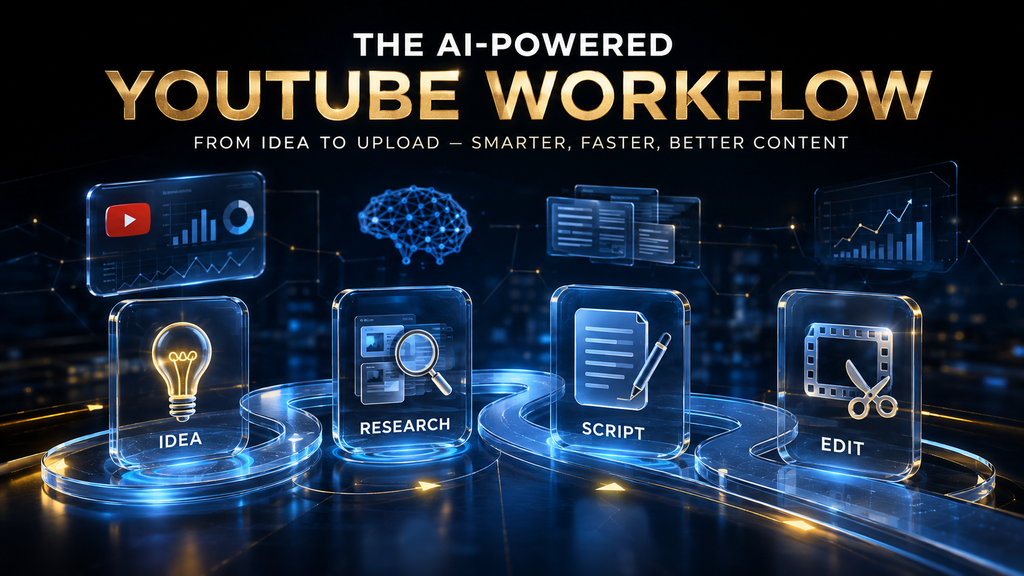
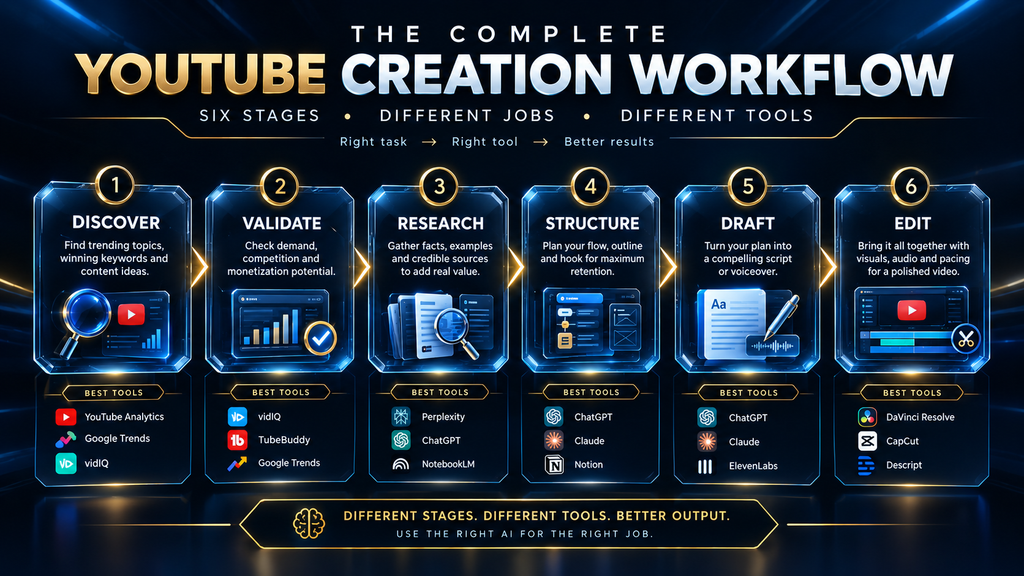
The first mistake is thinking of “AI scripting” as one task. It is better understood as a chain of six connected decisions: discover, validate, research, structure, draft, and edit.
Discovery is where potential topics come from. You might start with audience questions, comments, search behavior, competitor videos, your own experience, current events, or a deliberate brainstorming session. Validation is what happens next. A topic can be interesting and still be a poor candidate for your channel because demand is weak, the competition is overwhelming, the angle is too broad, or the audience has little reason to choose your version of the story.
Research begins only after the idea survives that first filter. For a lightweight opinion video, research may be minimal. For a history documentary, scientific explainer, business case study, or investigative story, it can become the largest part of the workflow. You need sources, chronology, evidence, competing interpretations, and enough context to avoid turning an AI-generated summary into a collection of plausible but unsupported statements.
Then comes structure. This is where you decide what the viewer should understand by the end of the video, what belongs in the first minute, where the strongest example should appear, what should be cut, and how the argument or story should develop. Only after that should the actual drafting begin.
Editing is the final and most neglected stage. It is where you remove generic language, correct weak reasoning, strengthen the hook, verify claims, adjust pacing, and make sure the finished script sounds like your channel rather than like the default output of whichever model you happened to use.
This six-stage workflow gives us a better way to evaluate AI tools. A tool can be excellent at one stage and almost irrelevant to another. That is not a weakness. It is simply how specialized software works.
The Best AI Tools for YouTube Ideas and Script Writing
There is no honest universal ranking because creators do not share the same bottleneck. A channel with hundreds of videos may need help finding its next topic, while a new educational channel may already know exactly what it wants to cover but struggle to organize research. A commentary creator may need almost no research assistance at all and simply want a strong outlining and revision partner.
The tools below are therefore ranked by best-fit use case, not by a fabricated “overall winner.
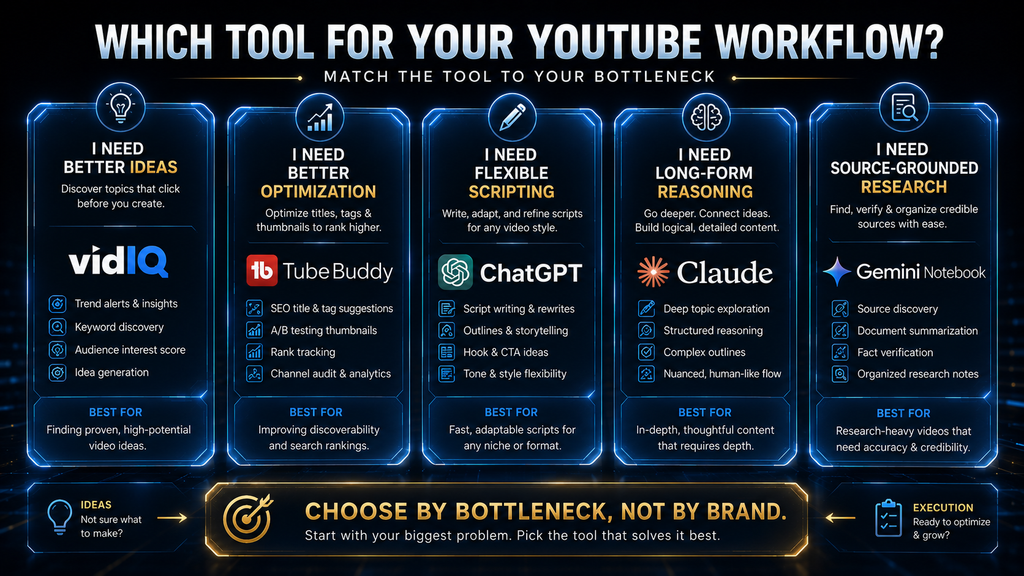
1. vidIQ — Best for YouTube Idea Discovery
Best for: creators who repeatedly struggle with deciding what to make next.
vidIQ is useful because it is designed around the YouTube environment rather than around general writing. Its idea-generation and creator-intelligence features are intended to surface potential topics using signals such as existing channel content, related topics, successful videos, keywords, and other YouTube-oriented information. The company also provides predictive signals intended to help creators compare the relative potential of different ideas, although those predictions should be treated as prioritization tools rather than guarantees of views.
That difference becomes important when you compare vidIQ with a general AI chatbot. Ask a chatbot to produce twenty video ideas about artificial intelligence and you will probably receive twenty perfectly reasonable suggestions. The problem is that “reasonable” is not the same thing as “worth making.” A YouTube-focused tool can give you more context around the opportunity, while a general AI model is usually better at exploring angles, framing the idea, and turning it into a narrative.
For an established channel, this is where vidIQ can be genuinely valuable. If you already know your niche and regularly find yourself staring at a blank content calendar, idea discovery becomes an operational bottleneck. Instead of spending an hour brainstorming from memory, you can use a specialized tool to narrow the field and then spend your time evaluating the strongest candidates.
There is, however, an important limitation. A YouTube intelligence platform becomes more useful when there is channel history and audience context to work with. A brand-new channel does not yet have the same depth of evidence as an established one, so paying for a sophisticated idea engine before you have a clear niche and several pieces of content may be premature. For a creator who is still choosing a direction, a good brainstorming workflow and a strong niche framework may be enough at first.
That is also why it is worth checking YouTube’s own tools before paying for a third-party platform. YouTube has been moving creators toward Ask Studio for brainstorming and channel assistance, while its creator ecosystem continues to provide native audience and trend signals.
The strategic lesson is simple: use vidIQ when idea discovery is a real bottleneck, not because owning a creator-intelligence subscription feels like a sign that your channel is becoming serious.
2. TubeBuddy — Best for Optimization, Testing, and YouTube Workflow
Best for: creators who already have a steady flow of content and want more evidence around packaging and optimization.
TubeBuddy overlaps with vidIQ in several areas, but its most compelling use case is different. Its current toolset includes keyword research, search-oriented features, content strategy, analytics, title and thumbnail tools, and A/B testing. That makes it particularly useful when the problem has shifted from “What should I make?” to “How do I package and improve what I already made?”
Consider a creator with a strong script ready to publish. The topic is solid, the video is useful, and the creator has a clear audience. At that point, generating ten more AI scripts is not necessarily helpful. The higher-value question may be whether the current title, thumbnail, or metadata gives the video a strong chance to earn the click it needs to be evaluated in the first place.
This is where testing becomes more valuable than guessing. Creators routinely debate whether one title “sounds more clickable” or whether a certain thumbnail “looks better,” but audience behavior is often less predictable than creator opinions suggest. A testing-oriented tool gives you a path from subjective preference toward evidence, provided the channel has enough traffic for the tests to mean something.
That last qualification matters. Optimization tools are not magic. Testing a thumbnail on a tiny channel with insufficient traffic does not suddenly create statistically useful certainty. Likewise, a high keyword score does not compensate for a weak idea, poor pacing, or an unconvincing opening.
This is why I would not automatically choose TubeBuddy over vidIQ or vice versa. They can overlap, but their strongest use cases differ. vidIQ makes more sense when your bottleneck is discovering your next opportunity; TubeBuddy becomes more interesting when you already have a content engine and want to improve how that content performs.
For many solo creators, there is no reason to pay for both on day one.
3. ChatGPT — Best All-Around YouTube Writing and Thinking Assistant
Best for: creators who want one flexible tool for brainstorming, outlining, drafting, rewriting, critique, and content development.
ChatGPT remains one of the most practical choices because it does not need to dominate any single stage of the YouTube workflow. Its strength is flexibility. You can use the same conversation to test three different video angles, challenge your premise, create a five-part outline, rewrite a weak hook, simplify a technical explanation, generate alternate transitions, critique a completed draft, and reshape the script for a different audience.
That flexibility is especially valuable for solo creators because it reduces the number of tools you have to switch between. But it also creates the most common problem with general-purpose AI: creators ask it to do everything in one step.
A prompt such as “Write me a ten-minute YouTube script about productivity” provides almost no editorial direction. The model has to invent the audience, the thesis, the structure, the examples, the tone, and even the definition of “interesting.” The result may be perfectly grammatical and completely forgettable.
The stronger workflow starts by giving the model the same information an experienced human writer would need. Tell it who the viewer is, what they already know, what the video is trying to prove, what the target length is, what tone the channel uses, what examples are available, what sources can be trusted, and what the video deliberately does not want to become.
Then build the outline before drafting the prose. This is one of the simplest changes a creator can make, and it often produces a disproportionate improvement because structural problems are much cheaper to fix when they exist as five bullet points than when they are buried inside 2,500 words of polished narration.
A strong ChatGPT workflow might look like this:
Idea → angle selection → outline → structural critique → revised outline → script draft → factual review → voice and pacing edit.
That is a very different process from asking for a finished script and pressing copy.
ChatGPT’s current pricing and available features vary by plan, with free and paid options available. But for most creators, the important question is not which subscription tier sounds impressive. It is whether the tool is being used to improve the workflow enough to justify paying for it.
In many cases, it is.
4. Claude — Best for Long-Form and Research-Heavy Drafting
Best for: creators producing longer explainers, documentaries, educational videos, and scripts built from substantial research.
Claude becomes particularly useful when the challenge is not simply writing sentences but maintaining coherence across a large amount of information. If your script depends on multiple documents, detailed research notes, competing explanations, or a long argument, the ability to work carefully through that material can become more important than generating clever sentences.
That makes Claude an attractive choice for channels covering subjects such as science, history, business failures, technology explainers, or other topics where the creator needs to maintain a clear relationship between the source material and the final narration.
There is a subtle distinction worth making here. Saying “Claude is better for long-form” should not be interpreted as “Claude is guaranteed to be more accurate.” No serious AI workflow should make that leap. A model can still misinterpret a source, overstate a conclusion, merge separate claims, or introduce unsupported specifics.
The right use of the tool is therefore closer to source material → structured reasoning → draft → human verification than topic → AI script → publish.
Claude’s current consumer plans include Free and Pro options, with Pro listed at $20 per month on monthly billing in the United States and additional capabilities available at higher usage levels.
For a creator who mainly makes short commentary videos, those strengths may not matter much. For someone producing twenty-minute educational explainers from dozens of pages of research, they can matter considerably.
The real decision is not “Claude versus ChatGPT forever.” It is which environment fits the work you actually do most often.
5. Gemini Notebook — Best for Source-Grounded Research Synthesis
Best for: research-heavy YouTube channels that work from articles, PDFs, reports, notes, transcripts, or other source material.
Research is the stage that most AI YouTube workflows handle badly. Creators either skip it entirely and rely on a model’s general knowledge, or they collect a pile of material and throw everything into one conversation without building a clear system for understanding the sources.
A source-grounded notebook solves a different problem from a normal chatbot. Instead of asking an AI to produce a story from a topic, you give it the materials behind the story and use it to help organize, summarize, compare, and interrogate those materials.
Google renamed NotebookLM to Gemini Notebook in July 2026 as part of a broader expansion of the product. For YouTube creators, the name matters less than the workflow: it can act as a research layer between the source documents and the final writing model.
Imagine you are preparing a video about the collapse of a once-dominant technology company. You might have annual reports, interviews, industry analysis, reputable journalism, financial information, and your own notes. Before writing anything, you want to know what the sources agree on, where they disagree, which claims are strongly supported, which explanations remain contested, and which details actually help tell the story.
That is where a research notebook is useful.
The key insight is that research and writing are not the same cognitive task. Research tells you what the evidence supports. Editorial judgment decides what deserves to become part of the story.
For a research-heavy channel, a very strong combination is therefore:
YouTube research → Gemini Notebook → ChatGPT or Claude → human verification.
You do not necessarily need all four for every video. A lightweight topic may skip the research notebook entirely. But once the material becomes complex enough, separating the research stage from the writing stage can dramatically improve clarity and reduce the temptation to let the model invent missing pieces.
What About Jasper?
Jasper is a good example of why “best AI writing tool” and “best AI tool for YouTube creators” are not necessarily the same question.
Jasper is positioned heavily around marketing teams, brand consistency, content operations, and multi-brand workflows. Its current pricing is also substantially higher than many general AI assistants, making the economics harder to justify for a solo creator whose only requirement is writing YouTube scripts.
That does not mean Jasper is a bad choice. It means its strongest capabilities solve a broader organizational problem.
Imagine a company producing YouTube videos, blog posts, emails, social posts, ad copy, and landing pages across several brands. In that situation, centralized brand voice and marketing workflow controls can be valuable enough to justify a dedicated platform.
Now compare that with a solo creator who needs five scripts a month.
That creator probably gets more practical value from a general reasoning model and a YouTube-specific research tool.
So my honest position is straightforward: do not buy Jasper because a roundup says it is a powerful long-form writer. Buy it only when its broader marketing and brand-management capabilities solve a problem you actually have.
vidIQ vs. TubeBuddy: Which One Should You Choose?
This is one comparison where trying to crown a permanent winner misses the point.
Ask yourself one question:
What is hurting your channel more right now: finding good topics or improving the performance of the topics you already produce?
If you repeatedly struggle with the first question, vidIQ is the more natural starting point. Its idea-oriented features are designed to help creators identify potential topics using YouTube-specific context.
If your channel already produces consistently and your bigger concern is packaging, testing, keyword workflows, or optimization, TubeBuddy becomes more compelling.
There is also a third option that many beginners overlook: use neither until you need one.
If your channel is still experimenting with its niche, content style, audience, and publishing rhythm, sophisticated optimization tools may create the illusion of progress while leaving the core creative problem untouched. You do not need a data dashboard to discover that your video is boring.
Build something worth optimizing first.
Then optimize it.
Why Most Creators Buy AI Tools in the Wrong Order
There is a pattern behind a lot of creator-tool purchasing. New creators discover title generators, keyword explorers, thumbnail analyzers, AI script generators, automation tools, voice tools, and video generators before they have established a repeatable content process.
It feels productive because the tools create visible activity. But activity is not the same thing as leverage.
Suppose your video opens with a vague explanation, spends five minutes repeating common knowledge, and reaches the useful point only near the end. Improving the title may increase the number of people who click, but it does not solve the deeper problem. You are optimizing the entrance to a weak experience.
The same applies to topic research. If you have no idea what your channel stands for, generating thirty more video ideas simply gives you thirty ways to stay unfocused.
The order should generally be:
Strong audience problem → worthwhile premise → clear promise → strong structure → useful script → effective packaging → performance analysis.
That sequence does not mean optimization tools are unimportant. It means they become more valuable after the creative foundation is strong enough for their data to matter.
Do You Actually Need More Than One AI Tool?
Most creators do not.
The AI ecosystem creates a strong psychological temptation to collect tools. One application finds ideas, another writes scripts, another researches the web, another summarizes documents, another generates hooks, another optimizes titles, and another creates the final video.
The result can be a workflow that looks sophisticated and behaves badly.
Every additional tool introduces setup time, switching costs, learning curves, subscriptions, and another place where information can become disconnected from the rest of the process. A creator can spend so much time moving content between systems that the supposed productivity gain largely disappears.
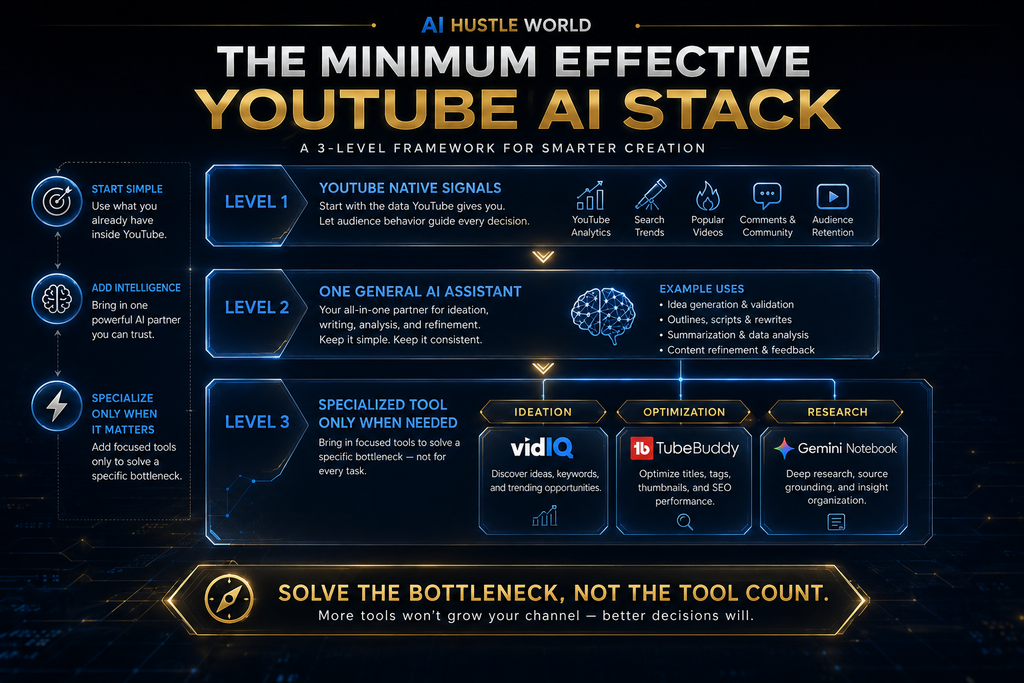
The better approach is the minimum effective stack.
For a beginner, YouTube plus one general AI assistant may be enough. For a creator who is consistently running out of topics, adding vidIQ can make sense. For a creator whose main concern is packaging and testing, TubeBuddy may be the better specialization. For research-heavy content, Gemini Notebook can add a genuine research layer.
The objective is not to own the biggest AI stack.
The objective is to remove your biggest bottleneck with the fewest moving parts.
The Practical AI Workflow for Creating a YouTube Script
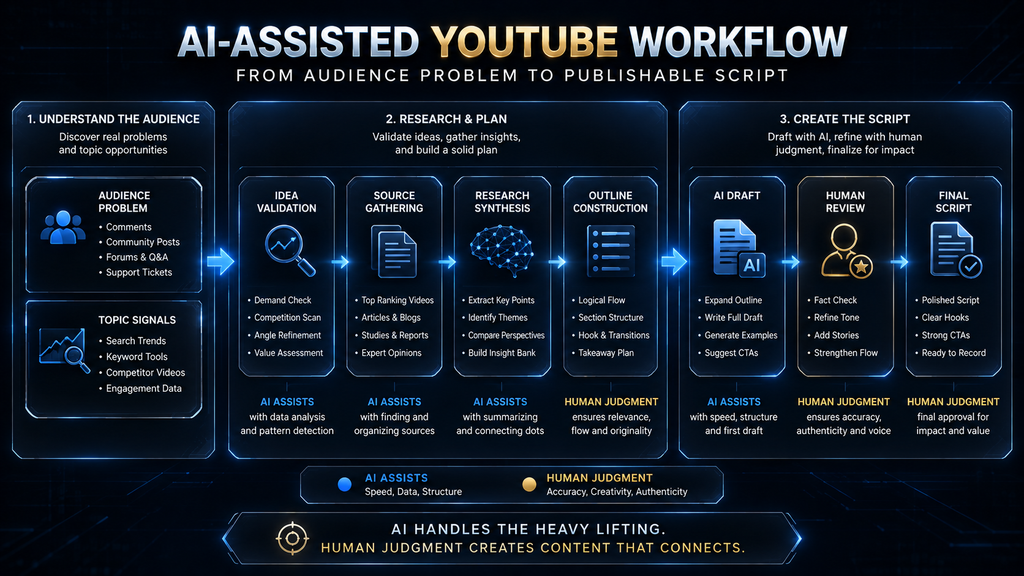
Start With the Audience Problem
Do not begin by asking what an AI tool can generate. Begin by asking what your audience needs explained, solved, compared, challenged, or understood.
This sounds like a small distinction, but it changes the entire creative process. “AI productivity tools” is a broad topic. “Why most AI productivity systems become more complicated than the problem they were supposed to solve” is a specific editorial idea with a point of view.
That point of view gives the script somewhere to go.
For creators building a faceless channel, the same principle applies before the scripting stage. A strong niche and a defined audience make every later AI decision easier. Our guide to 15 Faceless YouTube Channel Niche Ideas That Actually Work in 2026 covers that earlier decision.
Generate Several Angles, Not One Topic
Once you have the audience problem, explore different ways to approach it.
Imagine the broad topic is “AI tools for productivity.” You might develop angles around why productivity stacks become bloated, which AI workflows are actually worth automating, where AI creates more work than it removes, or how much automation is too much.
The underlying subject barely changes, but the viewer promise changes significantly.
That is why good ideation is not simply generating more topics. It is generating better angles.
A specialized tool can help with topic discovery, while a general AI assistant can help you explore the possible interpretations and narrative directions.
Use each where it is strongest.
Validate the Premise Before Writing
The fact that a topic is interesting does not mean it deserves a video.
Look at the audience, the competitive landscape, the coverage already available, and the reason your version should exist. For an established channel, your own performance history is another valuable signal. You may discover that certain subjects consistently attract the right viewers while others repeatedly produce weak engagement even when the topic looks attractive on paper.
This is also where YouTube’s native tools deserve more attention than they usually receive. Ask Studio and other creator features increasingly provide information directly inside YouTube rather than requiring every insight to come from a third-party platform.
Treat third-party scoring systems as signals rather than verdicts.
Build the Research Packet
For research-heavy content, create the source set before asking for the finished script.
Collect the material you trust, then identify the major claims, the strongest evidence, competing explanations, useful examples, unresolved questions, and details that are interesting but ultimately irrelevant to the story.
This is where a source-grounded research tool can be more useful than a generic chatbot. Instead of asking the model to remember everything about the subject, you are giving it a controlled body of material and asking it to help organize what is actually there.
That workflow is closely related to the broader research systems we cover in Best AI Research Assistants (Free & Paid): Top 10 Tools Compared.
Build the Outline Before the Draft
This is arguably the highest-leverage habit in AI-assisted writing.
Before asking for paragraphs, decide what the video is trying to make the viewer understand. Then give the model the job of turning that logic into a structure.
A useful outline should make the opening promise clear, establish the sequence of ideas, create progression rather than repetition, and identify where the strongest evidence or example belongs. It should also reveal anything missing.
An outline is cheap to rewrite.
A 3,000-word draft is not.
Draft With Real Constraints
Once the structure works, give the model enough information to produce useful prose.
Instead of saying:
“Write an engaging YouTube script about AI automation.”
give it the audience, target length, central thesis, tone, examples, hook strategy, and boundaries.
A stronger instruction might ask for an eight-minute educational script aimed at intermediate business owners, built around the argument that automation should remove repetitive decisions rather than replace high-consequence judgment, with a specific opening example and three concrete use cases.
The exact prompt is less important than the principle.
The model writes better when you define the editorial problem before asking it to solve the language problem.
Run an Adversarial Editing Pass
Once the draft exists, stop asking whether the writing merely “sounds good.”
Ask more difficult questions.
Where is the script generic? Which claim needs verification? Which sentence sounds like AI filler? Where does the argument repeat itself? Which section could be removed? Is the first thirty seconds actually specific? Does the conclusion provide a real takeaway, or does it simply restate the introduction?
This is where the creator’s role becomes more important, not less.
The model can produce language.
You decide what the language is actually allowed to say.
Why Research-Heavy Content Still Takes Real Work
One of the biggest promises surrounding AI content tools is that they will make research-heavy video creation dramatically faster.
That promise needs a reality check.
AI can reduce the amount of time spent organizing information, drafting prose, comparing sources, and creating first-pass structures. But it does not erase the underlying research problem.
Sources still have to be read.
Contradictions still have to be resolved.
Facts still have to be checked.
You still have to decide which details deserve to survive the editing process.
The more serious the subject, the more dangerous it becomes to confuse fluency with verification.
This is why the real productivity gain is often a change in where your time goes, not the disappearance of work. A creator may spend far less time typing while spending more time reviewing. That is not necessarily a bad result. In high-quality content production, moving effort from sentence generation to judgment can actually improve the final product.
The goal is not maximum AI-generated words per hour.
The goal is maximum useful output per unit of creator attention.
The Human Editing Pass Is Where Your Channel Voice Appears
AI-generated scripts often fail in the same predictable place: they sound like language rather than like a creator.
Consider a generic opening for a history video:
“Ancient Rome was one of the most powerful civilizations in history, and today we are going to explore some fascinating facts about Roman life.”
Nothing is grammatically wrong with it. It simply does not give the viewer much reason to care.
A stronger opening would lead with a specific fact, contradiction, consequence, or surprising detail that gives the viewer a concrete reason to continue.
That difference illustrates what editing actually does.
The creator decides which detail is interesting enough to lead with. The creator decides what can be removed, where skepticism should be acknowledged, which point deserves emphasis, and what the audience already knows well enough to skip. The model can help rewrite the sentence after those decisions have been made, but the editorial decision has to come first.
That is the part of the workflow you should protect.
This also explains why the same AI model can produce radically different results for two creators. The difference is often not the model. It is the quality of the instructions, source material, constraints, and editorial judgment surrounding the model.
Why AI-Generated Scripts Sound So Generic
The first reason is usually lack of specificity. When the prompt contains no strong point of view, the model must invent one, and it tends to rely on familiar structures that have appeared countless times in training data.
The second reason is writing before deciding what the video is trying to prove. If the premise is unclear, the model compensates with additional explanation, which often creates scripts that are long but directionless.
The third reason is the model’s natural tendency toward completeness. AI assistants often try to be helpful by covering the whole subject. YouTube rarely needs the whole subject. A good video may deliberately exclude half the information available because that material weakens the central story.
The fourth—and most important—reason is that the creator never performs a real editing pass.
The first draft becomes the final draft.
That is backwards.
Treat the AI output as raw material. The finished script should contain choices shaped by your audience, your sources, your experience, your channel voice, and your editorial judgment.
The Prompt Library Effect
One of the most valuable assets you can build while using AI is not another subscription. It is a library of instructions that you have refined through actual work.
Save the prompts that consistently produce useful results. Organize them around jobs such as ideation, topic validation, research, outlining, hooks, drafting, editing, titles, and repurposing. Then improve them over time based on what worked and what failed.
After six months, a creator with a strong prompt library may produce substantially better first drafts using the same AI model than someone who buys a premium plan but sends generic requests every time.
The reason is simple: the prompt library captures your accumulated understanding of the workflow.
Instead of saving something vague like “write an engaging script,” you might eventually develop an instruction that tells the model to produce three opening options based on a specific fact, contradiction, or consequence; avoid generic phrases; assume the audience already knows the basic concept; and build curiosity around an underexplored implication.
That is reusable intellectual infrastructure.
For more on building stronger instructions, see A Beginner’s Guide to Writing AI Prompts That Generate Better Results.
A Worked Example: One Topic Through the Full Pipeline
Consider a research-heavy video titled:
“Why Did This Once-Dominant Technology Company Collapse?”
The weak approach is to give the title to a chatbot and ask it for a ten-minute script. The model now has to decide what the story is, what evidence matters, which explanations are credible, and how the narrative should unfold. That is far too much editorial responsibility to delegate to one prompt.
A stronger workflow begins with validation. You investigate the existing coverage, identify what has already been said, determine whether there is a meaningful gap, and decide what distinctive perspective your channel can contribute.
Then you build the research packet. Gather company reports, reputable journalism, interviews, industry analysis, and any other material you intend to trust. Use a source-grounded research environment to compare the explanations and identify disagreements before asking a writing model to turn them into prose.
Next comes the outline. Perhaps the video begins with the position the company once held, moves into the decisions that changed its trajectory, examines the external market forces involved, then investigates management and execution, and finally extracts the broader lesson.
Before drafting, challenge that structure.
Maybe two sections explain the same thing.
Maybe the conclusion is already obvious.
Maybe the opening tells the audience the answer too early.
Fix the structure.
Only then ask ChatGPT or Claude to produce the narration.
After the draft exists, verify every important claim against the research packet. Look for unsupported numbers, overstated certainty, invented specifics, or conclusions that go beyond the evidence.
Then perform the human edit.
That final step is what turns a technically competent AI draft into a publishable video script.
A Lighter Workflow for Simpler Channels
Not every video needs a research pipeline with multiple tools.
Imagine a channel producing practical productivity lists, general commentary, or lightweight educational videos. If the topic is simple and the factual burden is low, the workflow might be as short as:
topic selection → outline → draft → verification → edit.
Adding a research notebook, a second AI model, a keyword platform, and several other tools may create more complexity than value.
This is an important principle because AI workflows often become overengineered.
A sophisticated workflow is not automatically a better workflow.
The best workflow is the smallest one that protects the quality requirements of the content you are producing.
Which AI Stack Makes Sense for Your Channel?
| Your situation | Best starting stack | Why |
|---|---|---|
| Brand-new channel | YouTube + ChatGPT or Claude | Focus on building the creative process before buying specialized software |
| Established channel with idea fatigue | YouTube + vidIQ + ChatGPT/Claude | Better topic discovery plus flexible scripting |
| Established channel with packaging problems | YouTube + TubeBuddy + writing model | More emphasis on optimization, testing, and packaging |
| History, science, or business channel | YouTube + research notebook + Claude/ChatGPT | Better control over source-heavy workflows |
| Opinion or list-style channel | YouTube + general AI assistant | Often no dedicated research layer is necessary |
| Faceless channel at higher volume | Idea research + writing model + human editorial review | Helps scale without turning the final output into repetitive templates |
| Marketing team managing multiple brands | Broader marketing AI platform + specialist tools | Brand governance and collaboration can justify a larger stack |
The table is not meant to prescribe subscriptions. It is meant to show how the same tool can become valuable or unnecessary depending on the problem being solved.
Can AI-Generated YouTube Scripts Be Monetized?
This is one of the questions creators should ask before building an automated channel.
The idea that YouTube simply “bans AI content” is too simplistic. YouTube’s monetization guidance focuses on originality, authenticity, and whether content is repetitive or mass-produced, while its disclosure requirements distinguish ordinary production assistance from realistic synthetic or altered content that viewers could mistake for real events or people.
That distinction matters.
Using AI to brainstorm a topic, produce an outline, improve a sentence, organize research, or help draft a script is fundamentally different from publishing large volumes of interchangeable videos with little original editorial contribution.
The real risk is not the existence of an AI tool in the workflow.
The risk is that the finished content becomes generic, repetitive, and indistinguishable from thousands of other automated outputs.
That is why human editing matters for two reasons. It improves the content itself, and it helps preserve the original perspective that makes the channel worth watching in the first place.
A good principle is:
Use AI to compress the workflow, not to eliminate the creator.
A Useful Way to Think About Automation
The most useful AI automation is usually not the most aggressive automation.
Automate the repetitive parts.
Assist with synthesis.
Accelerate drafting.
Keep consequential editorial decisions human.
That distinction becomes especially important when the content carries factual, financial, scientific, legal, or reputational consequences. An AI model can help you move faster, but speed is not a substitute for accountability.
This is also why a human review step should be part of the workflow rather than an emergency fallback used only when something “looks wrong.”
The review is not a sign that AI failed.
The review is part of the system.
How Much Time Can AI Actually Save?
Claims such as “AI saves you hours every week” sound attractive because they are difficult to disprove and almost impossible to interpret without context.
A simple list-style video may become dramatically faster because the AI can handle the first-pass drafting.
A research-heavy documentary will not suddenly become effortless because a language model can summarize your source material. The underlying research still requires careful review, and the creator still needs to determine which facts belong in the final narrative.
What changes is where the work happens.
Instead of spending three hours turning an outline into sentences, you may spend one hour drafting and two hours reviewing.
Instead of manually comparing five sources line by line, you may use a research assistant to organize the differences and then spend your time verifying the important claims.
That is still a productivity gain.
The mistake is measuring productivity only by typing speed.
A stronger measure is:
How much high-quality, publishable output can I produce per hour of serious creator attention?
How AI Compares With Hiring a Scriptwriter
AI is not automatically the cheapest or best substitute for a human writer.
A capable scriptwriter brings experience that is difficult to reduce to a prompt. They may know how to pace a story, which information to cut, when to challenge the premise, how your audience behaves, and what your channel’s voice should sound like.
That expertise has real economic value.
For a new creator validating a niche, however, the economics may favor AI-assisted production. You can iterate on ideas, outlines, and drafts without committing to a recurring freelance cost for every experiment.
As the channel matures, the balance can change. Once revenue is predictable and the creator’s time becomes the scarce resource, paying a human writer for part of the drafting process can make sense while keeping AI for research assistance, ideation support, or editorial iteration.
This does not have to be an either-or decision.
The better question is:
Which parts of the workflow benefit most from human judgment, and which parts are repetitive enough to accelerate with AI?
Common Mistakes to Avoid
Using one AI tool for every job
A general AI assistant may be excellent at scripting but mediocre at YouTube-specific opportunity research. A YouTube intelligence platform may be excellent for topic discovery but unnecessary for long-form research synthesis.
Use the right tool for the job.
Writing the full script before reviewing the structure
This creates expensive revisions. A weak five-point outline is cheap to fix. A weak 3,000-word draft is not.
Treating predictive scores as guarantees
A topic score, demand estimate, or prediction is a signal. It is not a promise that a video will perform.
Your execution still matters.
Skipping source verification
The faster an AI model can produce a plausible explanation, the easier it becomes to mistake fluency for accuracy. For research-heavy topics, that can become a serious problem.
Publishing the first AI draft
A first draft is a starting point, not a finished product.
Using the same content template endlessly
A repeatable process is useful.
A repetitive final product is not.
YouTube’s current monetization policy explicitly addresses repetitive and mass-produced content.
Buying too many tools too early
Do not build a six-tool workflow around a problem you have not identified yet.
Starting every video from zero
Your previous scripts, hooks, audience questions, failed experiments, title tests, and successful structures contain useful information. Keep that knowledge and feed it into future work.
That internal library can become more valuable than another subscription.
What Should You Use for a Faceless YouTube Channel?
Faceless channels add another layer because the script often has to carry more of the viewer experience. There may be no on-camera personality creating connection through facial expression or spontaneous delivery, so the narration, pacing, structure, and visual instructions have to work harder.
That does not mean a faceless creator needs more AI tools.
It means the workflow needs stronger editorial discipline.
For many faceless channels, a practical setup is YouTube for audience signals, vidIQ or TubeBuddy when specialized research or optimization is needed, and ChatGPT or Claude for the writing stage. Research-heavy channels can add Gemini Notebook when source management becomes a real bottleneck.
The production workflow can then continue into visual and voice tools after the script is ready. We cover that stage separately in 7 Best AI Video Tools for a Phone-Only Faceless YouTube Channel.
If narration is part of the workflow, our guide on How to Use ElevenLabs for YouTube & Faceless Videos covers the voice-production side rather than the research and scripting problem addressed here.
The important thing is not to confuse the existence of more production tools with the need for more subscriptions.
What Happens If You Do Nothing?
You can absolutely build a YouTube channel without AI.
The issue is not that manual work has suddenly become impossible. The issue is where your time goes while doing it.
You may spend an hour deciding between several similar ideas, another hour gathering information that later turns out to be irrelevant, and another hour writing an introduction that gets rewritten after the structure changes.
Eventually, the real bottleneck becomes creator attention.
AI can reduce some of that friction. It can help you explore more angles, organize information faster, create first drafts, and identify structural problems earlier in the process.
But there is an equally important danger on the other side.
If you automate everything, you can end up with a channel that is efficient to produce and difficult to care about.
The solution is not maximum automation.
The solution is selective automation.
Use AI where repetition is expensive. Use AI where synthesis is tedious. Use AI where drafting takes time but judgment is still easy to retain.
Keep the decisions that define the channel human.
The Future of AI YouTube Creation Is About Workflow, Not One Magic Tool
As AI models improve, it is tempting to assume that one platform will eventually do everything: discover the topic, research it, write the script, generate the voice, produce the visuals, create the thumbnail, publish the video, and analyze the result.
Some systems may eventually move in that direction.
But the underlying jobs are still different.
Discovering what an audience wants is not the same problem as understanding a research corpus. Understanding a research corpus is not the same as designing a narrative. Designing a narrative is not the same as optimizing packaging. And optimizing packaging is not the same as deciding whether the original video deserved to be made.
That means the advantage may increasingly shift from tool knowledge to workflow knowledge.
Creators will have access to more capable models than ever. The scarce skill will be knowing what information to give those models, when to use them, what not to delegate, and how to maintain a distinctive editorial point of view throughout the process.
That is the deeper strategic shift.
AI capability is becoming easier to access.
Good editorial systems are becoming more valuable.
Frequently Asked Questions
What is the best AI tool for writing YouTube scripts?
For most creators, ChatGPT or Claude is the best place to start because both can support outlining, drafting, rewriting, and iterative refinement. The better choice depends on the creator’s workflow, especially the length and research intensity of the videos.
The most important factor, however, is not which model produces the most polished first draft. It is how well the creator defines the audience, premise, structure, and constraints before asking the model to write.
What is the best AI tool for YouTube video ideas?
vidIQ is a strong choice when idea discovery is the primary bottleneck because its tools are designed around YouTube-specific context and creator workflows. YouTube’s own creator tools should also be part of the process before you assume a third-party subscription is necessary.
The best idea tool is ultimately the one that helps you make better topic decisions, not merely produce more topic suggestions.
Is ChatGPT good for YouTube scripts?
Yes. ChatGPT is especially useful for brainstorming angles, building outlines, drafting narration, generating hook variations, revising sections, and critiquing completed scripts.
It becomes significantly more useful when you give it specific information about your audience, channel voice, target length, central thesis, examples, sources, and structural constraints.
Is Claude better than ChatGPT for YouTube?
There is no universal winner. Claude can be particularly attractive for longer and more research-heavy workflows, while ChatGPT is a strong all-purpose environment for creators who want flexibility across ideation, scripting, research support, and revision.
Use the model that fits your workflow rather than choosing based on a generic leaderboard.
Which tool is better for YouTube ideas: vidIQ or TubeBuddy?
vidIQ is generally the more natural choice when the main problem is discovering and evaluating what to make next. TubeBuddy becomes more compelling when your channel already produces content and your bigger challenge is optimization, packaging, testing, and channel workflow.
You do not necessarily need both.
Do I need multiple AI tools for YouTube?
No. Many creators can start with YouTube’s own tools and one strong general AI assistant. Add specialized platforms only when a specific bottleneck becomes important enough to justify another subscription.
A small, well-designed stack is usually better than a large collection of overlapping tools.
What is the best AI tool for research-heavy YouTube videos?
A source-grounded environment such as Gemini Notebook can be valuable when your videos depend on multiple articles, PDFs, reports, notes, or other source material. It can sit between raw research and the writing model, helping you organize and compare the evidence before the script is drafted.
For a research-heavy workflow, the combination of source-grounded research + ChatGPT or Claude + human verification is often more useful than asking one model to do everything.
Can AI-generated YouTube scripts be monetized?
AI assistance does not automatically make content ineligible for monetization. YouTube’s current guidance focuses on originality, authenticity, and whether the finished content is repetitive or mass-produced.
The important distinction is between using AI as part of the production workflow and publishing content that is effectively interchangeable, repetitive, and lacking meaningful original contribution.
Do I have to disclose that AI helped write my script?
Not simply because AI helped with an outline, script, title, thumbnail, ideas, or other ordinary production assistance. YouTube’s disclosure rules focus more specifically on realistic synthetic or altered content that could mislead viewers about real people, places, or events.
Creators should still follow YouTube’s current disclosure guidance for the specific type of synthetic or altered media they publish.
Is Jasper worth it for YouTube scripts?
For most solo creators who only need YouTube scripting, it would not be my first purchase. Jasper becomes more compelling when YouTube is part of a broader marketing operation that needs brand consistency, collaboration, and multi-format content workflows.
Can I run a YouTube channel with only ChatGPT?
Yes. You can use ChatGPT for brainstorming, outlining, drafting, and editing while using YouTube’s own tools for audience and channel information.
The limitation is not that ChatGPT cannot generate ideas. It is that a general model does not automatically possess all the channel-specific context that a dedicated YouTube intelligence platform can provide.
Is AI better than hiring a YouTube scriptwriter?
Not automatically.
AI is excellent at reducing drafting and iteration costs. A strong human writer brings judgment, experience, pacing instincts, audience understanding, and editorial taste. The best choice depends on the maturity of the channel and which part of the workflow is currently consuming the most valuable resource: money or creator time.
Final Thoughts
The biggest mistake creators make when evaluating AI YouTube tools is asking which one writes the best script.
That question comes too late.
Before a script exists, someone has to decide whether the idea deserves a video, whether the audience has a reason to care, what information is reliable, what the central argument should be, and what the viewer should remember when the video ends. A language model can help with many of those tasks, but those tasks are not identical, and no single tool is automatically best at all of them.
That is why the strongest AI workflow is usually smaller and more deliberate than the average tool roundup suggests. Use YouTube’s own signals first. Add vidIQ when discovering ideas becomes a real bottleneck. Add TubeBuddy when optimization and testing become more important. Use ChatGPT or Claude for thinking, structuring, drafting, and revision. Bring in Gemini Notebook when your research becomes substantial enough to deserve its own layer.
Most importantly, do not confuse automation with authorship.
AI can help you move from idea to evidence, evidence to structure, and structure to draft much faster. What it should not remove is the creator’s role in deciding what matters, what deserves attention, what is true enough to say, and what makes the final video different from everything else competing for the viewer’s time.
The best AI tool for your channel is therefore not necessarily the newest, smartest, or most expensive one.
It is the tool that removes your biggest bottleneck while leaving your most important decisions in human hands.
That is how you build a YouTube workflow that is faster without becoming generic, more automated without becoming soulless, and more scalable without sacrificing the reason people subscribed in the first place.
More AI Tools, Guides & Workflows for Creators
Found the right YouTube workflow? Keep going with practical AI tools, tutorials, comparisons, and productivity guides designed to help you build faster without adding unnecessary complexity.
Explore AI Hustle WorldWritten by
Muntasir Ahmad Chowdhury
Founder, AI Hustle World
Muntasir Ahmad Chowdhury is the Founder of AI Hustle World, an independent publication dedicated to making Artificial Intelligence practical, trustworthy, and easy to understand. He researches AI tools, automation, customer service, productivity, and real-world business applications, helping readers make smarter technology decisions through research-driven, experience-backed content.
Expertise:
AI Tools • AI Automation • AI Customer Service • AI Productivity • Generative AI • AI Workflows
Get Smarter With AI
Enjoyed this guide? Get practical AI tools, tutorials, and honest reviews delivered to your inbox.
1 thought on “Best AI Script and Idea Generation Tools for YouTube Creators (2026)”