Last Update: August 2026
Understanding AI Privacy Risks Before Sharing Personal Information
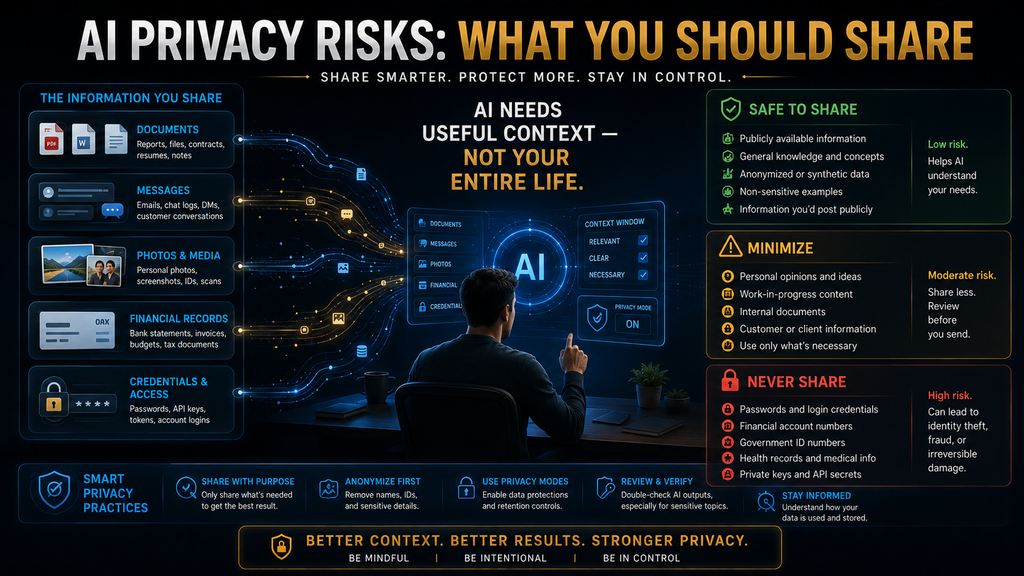
AI can help you write an email, summarize a document, analyze a spreadsheet, organize your schedule, explain a medical term, review a contract or brainstorm a business idea in seconds.
That convenience creates a new habit: people are giving AI systems more context about their lives.
And sometimes that context is far more sensitive than the user realizes.
You might paste a customer conversation into a chatbot because you want help writing a response. You might upload a résumé containing your phone number and address. You might screenshot a bank statement because you want help understanding a transaction. You might paste a medical question together with details about your condition because you want a clearer explanation.
None of those actions necessarily feels like a major privacy decision.
But it is.
The important question isn’t simply:
“Does this AI company train its model on my data?”
That is only one part of the picture.
You also need to consider what information you are providing, what other information the AI can access, how the service handles that information, what account or plan you’re using, how long information may be retained, whether human review can occur, and whether connected applications introduce another route for data to move.
Current privacy documentation from major AI providers demonstrates that these controls and practices differ significantly by product, account type and setting.
So the goal isn’t to stop using AI.
The smarter goal is to stop oversharing with AI.
What Are AI Privacy Risks?
AI privacy risks are the potential privacy problems created when personal, confidential or sensitive information is submitted to, processed by, stored by or connected to an AI system.
That can include obvious information such as:
- passwords
- authentication codes
- bank-account information
- government identification numbers
- private keys
- confidential business documents.
But privacy risk can also involve information that appears harmless in isolation.
A person’s:
- workplace
- location
- family situation
- health concerns
- salary
- travel plans
- customer information
- personal relationships
- browsing context
- photographs
- voice recordings
can become considerably more sensitive when combined.
This is the first principle to understand:
Privacy risk isn’t determined only by whether one piece of information looks sensitive. Context can make ordinary information sensitive.
A first name might be harmless.
A first name + employer + city + job title + medical condition + travel schedule is a very different information package.
AI systems can also receive information indirectly through files, images, connected applications and other product features. Google’s current Gemini privacy documentation, for example, describes information from prompts, files, videos, photos, browser content and connected applications, depending on how the service is used and configured.
That is why “don’t type your password” is useful advice—but nowhere near a complete privacy strategy.
The AI Privacy Exposure Ladder™
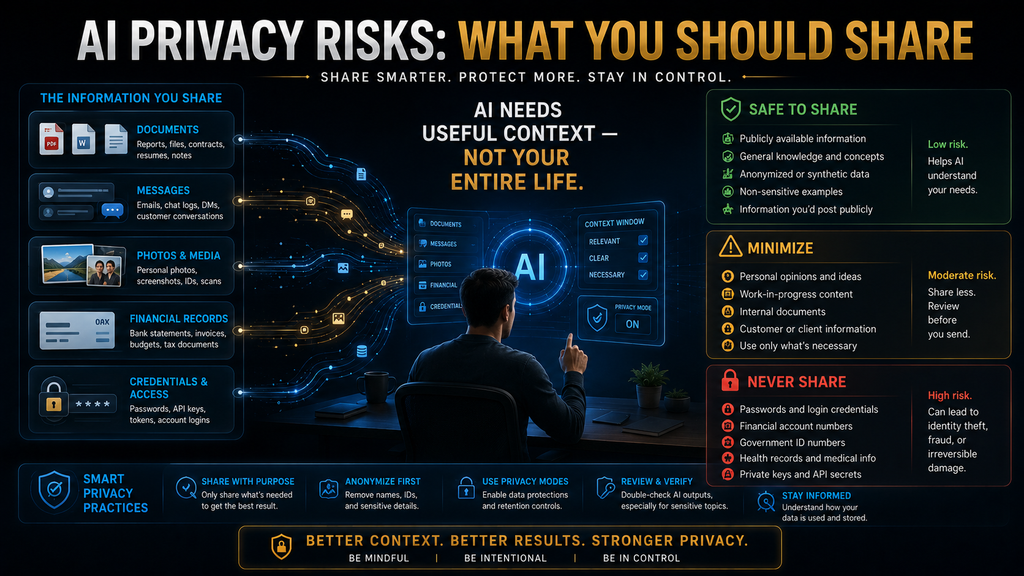
A practical way to decide what you should share with AI is to classify information by exposure level.
Level 1 — Public Context
This includes information that is already publicly available and does not materially increase your privacy exposure.
Examples:
- a public company description
- a published article
- a public product page
- publicly listed business information
- a general topic you’re researching.
These are generally lower-risk inputs.
But even here, the combination of multiple pieces of information can change the situation.
Level 2 — General Personal Context
This includes ordinary information about your preferences or circumstances.
Examples:
- “I’m a freelance designer.”
- “I’m learning Python.”
- “I run a small online store.”
- “I prefer short explanations.”
- “I’m planning a trip next month.”
This information can make AI responses more useful.
You don’t necessarily need to avoid it.
The goal is simply to avoid adding unnecessary identifying details.
Level 3 — Identifiable Personal Context
Now the information begins connecting directly to a person.
Examples:
- full name
- personal email
- phone number
- home address
- employer
- student ID
- exact location
- detailed employment information
- identifiable customer information.
At this level, ask:
Does the AI actually need the identifying information to complete the task?
Often it doesn’t.
If you want AI to rewrite a customer complaint, for example, it usually doesn’t need the customer’s real name, phone number or account number.
Level 4 — Sensitive Information
This includes information where unauthorized disclosure could create meaningful personal, financial, professional or legal consequences.
Examples include:
- medical information
- financial information
- legal matters
- employment disputes
- confidential business information
- private communications
- children’s personal information
- sensitive personal circumstances.
This category deserves substantially more caution.
Level 5 — Credentials and Access Data
Never treat these as ordinary prompt context:
- passwords
- one-time authentication codes
- API keys
- private encryption keys
- recovery codes
- seed phrases
- access tokens
- full payment credentials.
If AI needs one of these to perform a task, stop and reconsider the workflow.
In most ordinary situations, the correct answer is:
Don’t provide it.
Why the Exposure Ladder Matters
A simple “don’t share sensitive data” rule sounds good until you have to decide whether something is actually sensitive.
The Exposure Ladder gives you a second question:
What is the minimum information required to accomplish this task?
That distinction is critical.
Suppose you want AI to summarize a 20-page contract.
The lazy workflow is:
Upload the entire contract.
The better workflow is:
- Determine what you need.
- Identify the relevant sections.
- Remove unnecessary personal information.
- Replace identifiers with placeholders.
- Upload only what the AI needs.
The objective isn’t zero data.
It’s minimum necessary data.
That principle aligns with the data-minimisation approach described by the UK’s Information Commissioner’s Office: personal data should be adequate, relevant and limited to what is necessary for the purpose, rather than collected simply because it might become useful later.
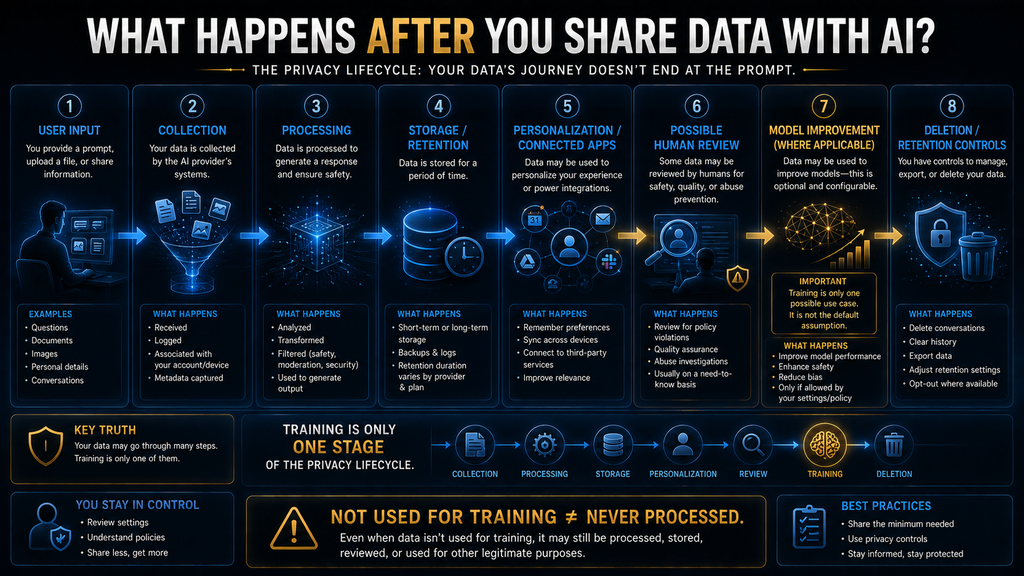
What Happens After You Submit Information to AI?
This is where privacy discussions often become too simplistic.
People ask:
“Does the AI train on my conversation?”
But there are several different stages to consider.
1. Collection
The system receives your prompt, file, image, audio or other input.
2. Processing
The information is processed to generate the response.
3. Storage
Depending on the product and settings, some information may be retained.
4. Personalization or memory
Some AI products can use information from previous interactions to personalize future responses.
5. Connected services
Your information may interact with connected applications or other services.
6. Human review
Some providers use human reviewers for certain data under specified circumstances.
7. Model improvement
Some consumer services allow certain user content to contribute to model improvement or training, subject to controls and settings.
8. Deletion and retention
Deleting a conversation doesn’t necessarily mean every related copy or reviewed record disappears instantly.
These are different privacy questions.
And they can have different answers.
Training Is Only One Privacy Question
This distinction is important enough to remember.
Suppose you turn off an AI provider’s model-training option.
That’s useful.
But it doesn’t automatically mean:
“This information never exists on the provider’s systems.”
The provider may still need to process information to deliver the service.
There may also be:
- security logs
- retention requirements
- feedback systems
- connected applications
- safety processes
- account-level storage
- temporary retention.
For example, OpenAI says users can turn off model improvement for new conversations, while Temporary Chat provides additional controls: Temporary Chats don’t appear in history, don’t create memories and aren’t used to improve models, although OpenAI says they may be retained for up to 30 days for safety purposes.
Google’s Gemini documentation similarly says that when Keep Activity is off, future chats aren’t used to train Google’s AI models unless feedback is submitted, but the chats can still be retained for up to 72 hours for service and safety purposes.
So:
“Not used for training” and “not processed or retained” are not the same statement.
That is one of the most important privacy distinctions for everyday AI users.
The Information You Forget Is Sensitive
Most privacy checklists mention passwords and credit-card numbers.
The more difficult problem is the information people don’t recognize as sensitive.
Screenshots
A screenshot might contain:
- your name
- email address
- account number
- notifications
- private messages
- browser tabs
- location information
- customer information.
If you’re asking AI to explain something visible in a screenshot, crop it first.
Documents
A résumé may contain:
- address
- phone number
- personal email
- employment history.
A contract may contain:
- signatures
- addresses
- payment terms
- customer names.
A spreadsheet may contain:
- customer records
- revenue
- employee information
- account identifiers.
Uploading the entire document is often unnecessary.
Photos
A photo can contain more than the object you’re asking AI to analyze.
It may reveal:
- faces
- location clues
- documents in the background
- computer screens
- house numbers
- children’s identities
- workplace information.
Crop before uploading when possible.
Personal Conversations
This category is becoming more important.
People increasingly use AI as a sounding board for:
- relationships
- anxiety
- career decisions
- financial problems
- health questions
- family situations.
A single message might not identify you.
But a long conversation can accumulate enough context to create a highly detailed personal profile.
That brings us to one of the most interesting findings in recent research.
Long AI Conversations Can Increase Privacy Exposure
A 2026 study titled Chatbot Confessions analyzed 100,342 shared conversations from ChatGPT, Gemini and Microsoft Copilot.
The researchers identified privacy issues in 8,131 conversations, approximately 8% of the analyzed dataset. They detected user identifiers, location information and smaller proportions of financial, health and authentication data.
More interestingly, the researchers found that privacy disclosures became more common later in longer conversations. They reported that 60% of private-data disclosures in longer conversations occurred in the final quartile of those conversations.
That finding deserves careful interpretation.
The dataset consisted of conversations users had chosen to share publicly, so it isn’t a direct estimate of how often privacy leakage occurs across all private AI conversations.
But it demonstrates an important behavioral pattern:
People can become less cautious as a conversation becomes longer and more personal.
You start with:
“Help me plan my week.”
Then:
“I work at a startup.”
Then:
“My manager is considering promoting me.”
Then:
“My salary is…”
Then:
“I’m dealing with…”
The conversation gradually becomes a detailed personal record.
This is why privacy isn’t only a single-prompt problem.
It can be a conversation-design problem.
What You Should Never Share With Consumer AI
There are exceptions for controlled enterprise environments, but for ordinary consumer AI use, treat the following as off-limits.
Passwords
AI does not need your password to explain how a website works.
Never paste one for troubleshooting.
Authentication Codes
One-time codes, recovery codes and authentication tokens should never be treated as ordinary text.
Private Keys and Seed Phrases
If you use cryptocurrency or other cryptographic systems, private keys and seed phrases are effectively access credentials.
Do not paste them into an AI chatbot.
Complete Financial Credentials
Avoid sharing:
- full card details
- online-banking credentials
- PINs
- account passwords
- security answers.
If you need help understanding a transaction, redact the identifiers.
Government Identification
Avoid uploading complete:
- passports
- national IDs
- driver’s licenses
- tax documents
unless you are using a specifically authorized and appropriate workflow.
Confidential Business Information
Be especially careful with:
- customer databases
- unreleased financial results
- acquisition plans
- proprietary source code
- confidential contracts
- employee records
- internal strategy documents.
An AI tool being convenient doesn’t automatically make it an approved corporate data-processing environment.
The Data People Often Forget to Remove
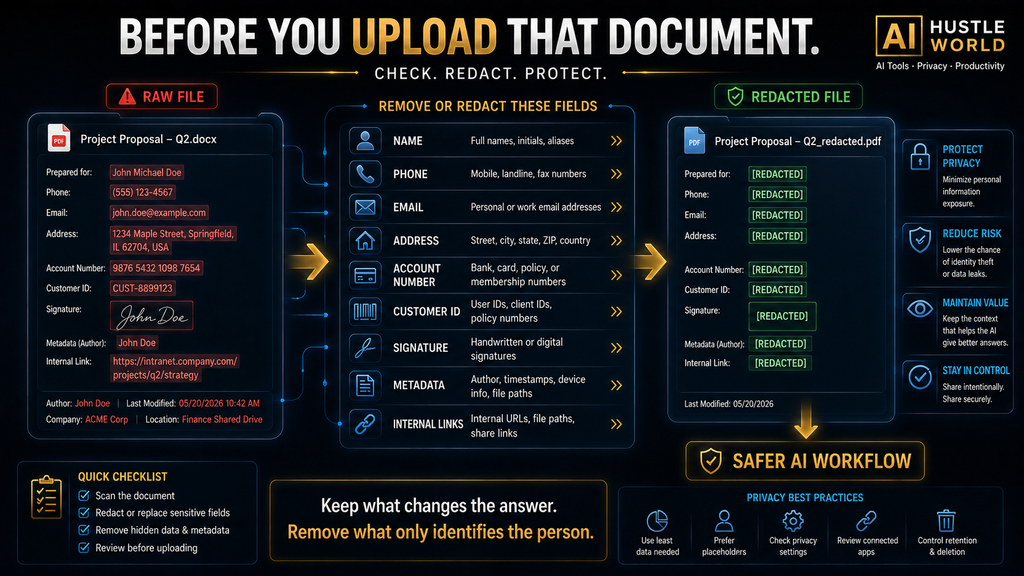
Before uploading a document, inspect:
Names
Email addresses
Phone numbers
Addresses
Account numbers
Customer IDs
Employee IDs
Dates of birth
Signatures
Metadata
Screenshots of other applications
Internal URLs
API keys
Tracking numbers
Location information
A document can contain more identifying information than its visible main text suggests.
REDACT → REPLACE → REDUCE → REVIEW
Here’s the practical privacy workflow I recommend for everyday AI use.
REDACT
Remove information that the AI doesn’t need.
Example:
John Rahman, Account #483921, Dhaka
becomes:
[CUSTOMER], [ACCOUNT ID], [CITY]
REPLACE
Use placeholders instead of real identifiers.
Examples:
[CLIENT]
[COMPANY]
[EMPLOYEE]
[DATE]
[ACCOUNT NUMBER]
This preserves the structure of the problem without exposing unnecessary identity information.
REDUCE
Don’t automatically send the whole document.
If you need AI to summarize section 7, provide section 7.
If you need help rewriting three paragraphs, provide three paragraphs.
If you need analysis of a single spreadsheet column, don’t necessarily upload the entire customer database.
This is where data minimization becomes practical.
REVIEW
Before pressing Send, ask:
- What information am I giving the AI?
- Does it actually need all of it?
- What account am I using?
- What privacy settings are active?
- Are connected apps enabled?
- Is this an approved tool for the information?
- Could I achieve the same result with anonymized data?
That final step is what turns privacy from a vague concern into a repeatable workflow.
ChatGPT vs Gemini vs Claude vs Perplexity: What Changes?
The mistake would be to create a simplistic ranking such as:
“Tool A is private; Tool B isn’t.”
Current documentation is more nuanced.
| AI service | Important consumer privacy controls / considerations |
|---|---|
| ChatGPT | Training controls, Temporary Chat, Memory controls and deletion/export controls |
| Gemini | Keep Activity, Temporary Chat, connected-app controls, memory/personalization and human-review considerations |
| Claude | Consumer training preference and different retention treatment depending on whether model improvement is allowed |
| Perplexity | AI Data Retention controls for consumer accounts and different protections for Enterprise |
The exact settings and policies can change, so readers should verify the provider’s current documentation before submitting sensitive information.
OpenAI says users can control model improvement and memory, while Temporary Chat isn’t used to improve models and is retained for up to 30 days for safety purposes.
Google’s current Gemini Privacy Hub says its consumer service can process prompts, files, photos, videos, browser content and connected-app data. It also describes human review of a subset of data and different behavior depending on Keep Activity and other settings.
Anthropic says Claude consumer users can choose whether their data is used for model training; its current policy says users who allow model training can have new or resumed chats retained for up to five years, while users who don’t choose that option remain under a 30-day retention period. Its commercial services are handled under separate terms.
Perplexity says Free, Pro and Max users have AI Data Retention enabled by default but can opt out of AI training data collection; Enterprise data is not used for AI training.
The lesson is not:
“Pick the safest AI.”
It’s:
Understand the product, account type and settings before deciding what data is appropriate to share.
Why Enterprise AI Is Different
This distinction matters for business owners.
A company may have contractual controls, administrative policies, retention settings, access controls and approved enterprise AI environments that aren’t available in the same form on a consumer account.
For example, OpenAI states that business data isn’t used to train its models by default. Perplexity similarly says Enterprise data isn’t used for AI training.
That does not mean:
“Enterprise AI makes any data safe.”
It means the risk environment and contractual/control framework can be different.
Businesses still need:
- data classification
- access control
- employee policies
- approved tools
- retention rules
- vendor review
- regulatory compliance.
An enterprise plan isn’t a substitute for governance.
Connected Apps Create Another Privacy Layer
This is an area many beginner privacy guides underemphasize.
Modern AI systems can connect to:
- cloud storage
- calendars
- photos
- documents
- productivity applications
- other services.
That can dramatically increase usefulness.
It can also increase the amount of information available to the AI workflow.
Google’s current documentation specifically explains that Gemini can work with connected apps and that some connected-app information may be subject to human review under certain circumstances.
So before connecting an application, ask:
What information does this connection expose that the AI didn’t have before?
Don’t only ask:
“What can this integration do?”
Ask:
“What new data can this integration see?”
That’s the privacy question.
Turning Off Privacy Settings Is Not the Whole Solution
Privacy settings are valuable.
Use them.
But don’t make them your only defense.
Imagine you turn off model improvement and then upload:
- your passport
- your medical history
- your financial records
- your customer database.
You have reduced one category of potential exposure.
You haven’t made the underlying decision sensible.
The strongest privacy strategy is still:
Don’t unnecessarily provide the sensitive information in the first place.
This is the practical application of data minimization.
What If You Already Shared Sensitive Information?
Don’t panic.
First determine what you actually shared.
Step 1: Identify the data
Was it:
- a password?
- an API key?
- financial information?
- medical information?
- an ID?
- confidential business data?
The response depends on the category.
Step 2: Delete the conversation if appropriate
Use the provider’s available deletion controls.
But remember that deletion does not necessarily mean every related record disappears immediately or under every circumstance. Provider policies describe exceptions for security, legal requirements or reviewed data.
Step 3: Revoke credentials
If you accidentally shared:
- a password
- API key
- access token
- recovery code
treat it as compromised.
Change or revoke it immediately.
Step 4: Check connected applications
If the information came through an integration, review the application’s permissions.
Step 5: Assess business impact
If confidential company or customer information was exposed, follow your organization’s incident-response process.
Step 6: Learn from the workflow
Don’t simply promise:
“I’ll be more careful.”
Create a rule.
For example:
“All customer data is anonymized before it enters consumer AI.”
A policy is more reliable than memory.
What If You Need AI to Work With Sensitive Information?
Sometimes removing all context makes the AI less useful.
The answer isn’t always “don’t use AI.”
Instead, redesign the workflow.
Suppose you want AI to analyze customer complaints.
You don’t necessarily need:
Maria Ahmed, +8801XXXXXXXXX, customer ID 82193
You may only need:
Customer A, female, 34, subscription customer, complaint category: delayed delivery.
Or perhaps even less:
Customer A, subscription customer, complaint category: delayed delivery.
The model can analyze the pattern without knowing the person’s identity.
This is a powerful general rule:
Preserve the information that determines the answer. Remove the information that merely identifies the person.
The Minimum-Context Principle
This is the article’s second major takeaway.
Before sending data to AI, divide it into two groups:
Answer-changing information
Information the AI genuinely needs to produce the correct result.
Identity/context information
Information that makes the example more realistic but doesn’t materially change the answer.
Keep the first.
Minimize the second.
For example, if you want AI to rewrite a complaint professionally, the customer’s full name probably doesn’t affect the writing.
If you want AI to evaluate whether a legal contract is enforceable in a specific jurisdiction, the jurisdiction may matter.
The key question isn’t:
“Is this information personal?”
It’s:
“Does this information materially change the task?”
Privacy Risk Is a Workflow Problem
This changes how we should think about AI privacy.
It’s tempting to frame privacy as a product feature:
“Does this chatbot have good privacy?”
But the risk often comes from the combination of:
User behavior + data sensitivity + AI product + account settings + connected services + retention + workflow design
That means privacy can’t be solved entirely by choosing another chatbot.
A user can overshare with a privacy-conscious service.
A company can misuse a secure enterprise platform.
A person can expose sensitive information through a screenshot without realizing it.
A privacy-aware workflow begins before the data reaches the AI.
A Simple AI Privacy Decision Matrix
Use this before sending information.
| Information type | Consumer AI? | Recommended action |
|---|---|---|
| Public article | Usually low risk | Use normally |
| General preferences | Usually reasonable | Share only what helps |
| Name/contact details | Use caution | Remove if unnecessary |
| Customer information | High caution | Anonymize |
| Medical information | High caution | Minimize and consider approved tools |
| Financial records | High caution | Redact heavily |
| Confidential business files | High caution | Use only approved environments |
| Government ID | Avoid where possible | Redact / don’t upload |
| Password/API key/token | No | Never provide |
| Private key/seed phrase | No | Never provide |
The point isn’t that every category has exactly the same risk in every product.
The point is to create a pause before upload.
Common AI Privacy Mistakes
1. Uploading the entire document
The user only needs one section analyzed.
Better: extract the relevant section.
2. Forgetting screenshots contain personal information
The visible object gets attention.
The background gets ignored.
Better: crop aggressively.
3. Assuming “training off” means “private”
It doesn’t necessarily.
Better: understand processing, retention, review and connected services too.
4. Using consumer AI for confidential work
Convenience wins over policy.
Better: use organization-approved tools and workflows.
5. Sharing credentials because AI “needs access”
AI generally doesn’t need your password.
Better: use supported authentication mechanisms rather than pasting credentials.
6. Revealing personal information gradually
A long conversation can become much more sensitive than the opening prompt.
Better: periodically reset the conversation or remove unnecessary personal context.
7. Connecting everything
An AI assistant becomes more useful as it gets more context.
That doesn’t mean it should have unlimited context.
Better: connect only services that provide a clear benefit.
8. Forgetting other people have privacy rights
Your customer’s information isn’t yours to casually upload just because you have access to it.
The same applies to:
- employees
- clients
- family members
- students
- patients
- coworkers.
Your access to information doesn’t automatically mean you have permission to submit it to an AI provider.
Who Should Be Extra Careful?
Everyone should practice basic data minimization.
But some users face higher consequences from mistakes.
Freelancers
Client files often contain personal or commercially sensitive information.
Small-business owners
Customer databases, financial records and internal strategy can be valuable targets.
Employees
Your employer may have specific rules governing which AI tools can process company information.
Students
Assignments, IDs, personal records and research data can reveal more than expected.
Healthcare and legal professionals
Sensitive information can trigger much stronger obligations.
Don’t assume a consumer chatbot is an appropriate environment merely because it is technically capable of processing the information.
Parents
Children’s data deserves extra caution.
Privacy practices around children’s data vary among providers, and Stanford researchers have specifically highlighted child-data concerns in their analysis of AI developer privacy policies.
What Happens If You Do Nothing?
You can continue using AI exactly as you do today.
Maybe nothing happens.
That is possible.
The problem is that privacy risk is often asymmetric.
The benefit of uploading a sensitive document might be:
Save five minutes.
The downside might be:
Unnecessary exposure of information that cannot easily be made private again.
That doesn’t mean every AI upload is dangerous.
It means the expected benefit should justify the exposure.
This is especially true when the information is:
- irreversible
- difficult to replace
- identifying
- confidential
- financially valuable
- medically sensitive
- credential-based.
A password can be changed.
A private conversation can be much harder to undo.
A 30-Second AI Privacy Check
Before sending anything sensitive, ask five questions:
1. What am I sending?
Prompt, screenshot, document, image, audio or connected data?
2. What is sensitive?
Names, IDs, health, money, business information, credentials?
3. Does the AI need it?
If not, remove it.
4. What account am I using?
Consumer, business, school, enterprise?
5. What controls are active?
Training, retention, memory, temporary mode, connected apps?
If you cannot answer those questions, don’t upload the sensitive material yet.
The Four-Step Privacy Workflow
For everyday AI use, remember:
REDACT
Remove unnecessary personal information.
REPLACE
Use placeholders instead of real identifiers.
REDUCE
Provide only the information required.
REVIEW
Check the AI service, account and settings before submission.
This is more useful than trying to memorize an enormous list of forbidden words.
Because the list will change.
The decision process won’t.
The Future of AI Privacy
AI assistants are moving toward more context, not less.
They can increasingly work across:
- conversations
- files
- calendars
- browsers
- images
- applications
- personal preferences.
That creates an obvious trade-off.
More context → more useful AI.
But also:
More context → potentially greater privacy exposure.
The answer isn’t to eliminate context.
It’s to make context intentional.
The best future AI workflows will likely be those where users and organizations can control:
- what information is available
- why it is available
- how long it remains available
- which applications can access it
- whether it can be used for improvement
- who can review it
- how it can be deleted.
That is the direction privacy-aware AI governance needs to take.
The Most Important Rule
If you remember only one thing from this article, remember this:
If AI doesn’t need the information to complete the task, don’t give it the information.
You don’t need to stop using AI.
You need to stop treating every AI prompt as if it were harmless.
Ask what the AI actually needs.
Remove what it doesn’t.
Use placeholders.
Minimize documents.
Review settings.
Be careful with connected applications.
And never give an AI chatbot credentials that would allow someone—or something—to access your accounts.
AI is most useful when it has enough context to help you.
It doesn’t need your entire life story to do the job.
Frequently Asked Questions
Is it safe to share personal information with AI?
It depends on the information, AI service, account type, settings and intended use. The safest general approach is to provide the minimum information required and remove unnecessary identifiers.
What information should I never share with AI?
Never provide passwords, one-time authentication codes, private keys, seed phrases, recovery codes or other credentials. Treat highly sensitive financial, medical, legal and confidential business information with additional caution.
Can ChatGPT store my conversations?
ChatGPT has multiple data controls. OpenAI says ordinary ChatGPT users can control whether new conversations are used to improve models, while Temporary Chats aren’t used to improve models and may be retained for up to 30 days for safety purposes.
Does turning off AI training make my information completely private?
No. Training is only one part of data handling. A service may still need to process information to provide the service, and different retention, security, feedback or legal processes may apply.
Is Gemini private?
Gemini has privacy controls, but its current documentation describes collection and processing of prompts, files, photos, videos and connected-app information, as well as human review of a subset of data under certain circumstances. Users should review their current settings before submitting confidential information.
Can I use AI with confidential business information?
Only when the AI product and account are approved for that type of information and the organization’s security, privacy and compliance requirements are satisfied. A consumer chatbot should not automatically be treated as an approved business environment.
Should I upload an entire document to AI?
Not necessarily. If only part of the document is needed, provide only that part and remove unnecessary identifying information.
Can screenshots expose private information?
Yes. Screenshots can contain names, email addresses, account information, notifications, locations, documents and other information outside the main object you’re trying to analyze.
What should I do if I accidentally shared a password with AI?
Change the password immediately. If you shared an API key, token or other credential, revoke or rotate it. Then review the relevant account and security logs where available.
Does AI privacy depend on the company?
Yes. Providers have different policies, settings, retention practices and account types. Even within one provider, consumer and business products can have different data practices.
Is AI privacy only about model training?
No. Privacy also involves collection, processing, retention, connected services, personalization, human review, security and deletion.
Final Thoughts
The privacy question around AI isn’t:
“Can I trust AI?”
That’s too broad to be useful.
The better questions are:
What information am I giving it?
Why does it need that information?
What happens to the information in this particular workflow?
What controls do I have?
Can I achieve the same result with less personal data?
That final question may be the most powerful.
AI doesn’t need maximum information.
It needs useful information.
The difference is where privacy-aware AI use begins.
Use AI Smarter — Without Oversharing
AI can be incredibly useful, but better results do not require giving it your entire personal or business context. Learn how to build safer, more reliable AI workflows with practical guides from AI Hustle World.
Explore AI Safety Guides →AI Hustle World — AI Tools • Reviews • Tutorials
Written by
Muntasir Ahmad Chowdhury
Founder, AI Hustle World
Muntasir Ahmad Chowdhury is the Founder of AI Hustle World, an independent publication dedicated to making Artificial Intelligence practical, trustworthy, and easy to understand. He researches AI tools, automation, customer service, productivity, and real-world business applications, helping readers make smarter technology decisions through research-driven, experience-backed content.
Expertise:
AI Tools • AI Automation • AI Customer Service • AI Productivity • Generative AI • AI Workflows
Get Smarter With AI
Enjoyed this guide? Get practical AI tools, tutorials, and honest reviews delivered to your inbox.
5 thoughts on “Understanding AI Privacy Risks Before Sharing Personal Information”